
External Agents: Skill and CLI
External agents use their own models and session environments to execute and inspect research through AxonX. This guide uses CLI access; read MCP integration when the host needs to discover service tools directly.
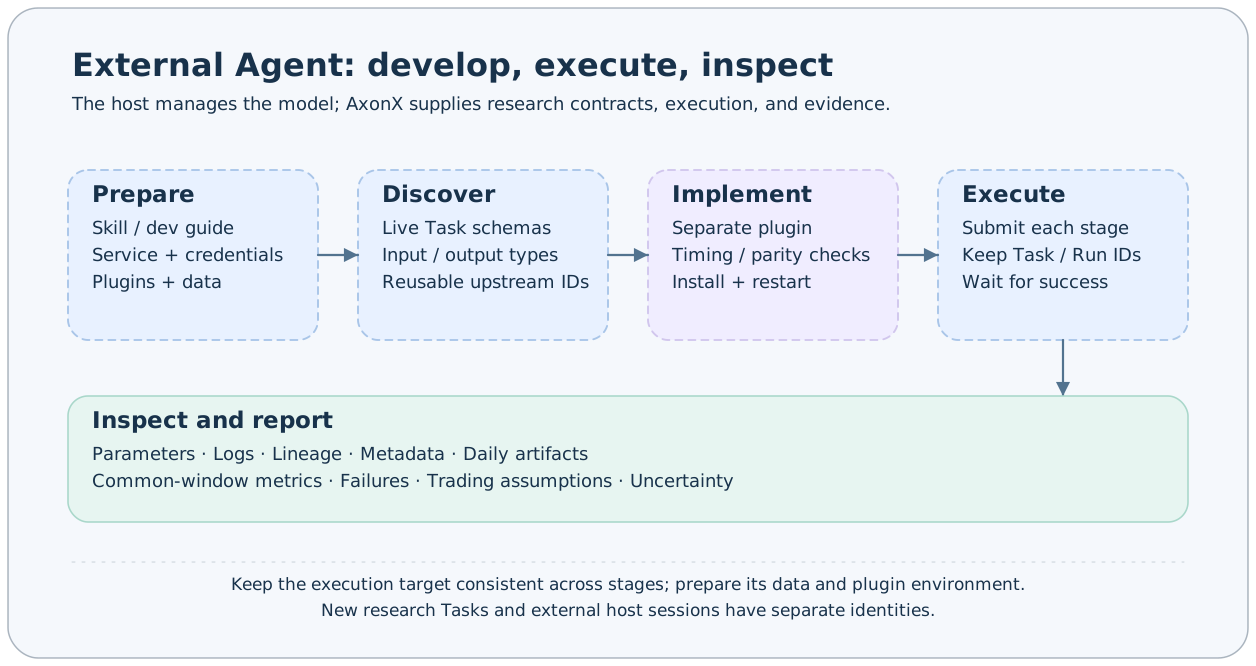
Prepare the service and instructions
Start a service with the quickstart, install research plugins in the execution service's Python environment, and prepare data. Remote plugins and workspaces need separate preparation; see remote machines. An agent using the CLI needs access to the axonx command.
The repository provides an AxonX Skill for contract discovery, submission and waiting, evidence inspection, and plugin development. Load it using the host's supported Skill mechanism; installation directories and configuration differ among hosts.
The Skill's relative documentation links refer to an AxonX source checkout. Keep that checkout and directory relationship, or adjust references to readable guide locations when deploying the Skill. Installing the Python package alone does not supply complete example plugin sources. You can also instruct the agent to read relevant sections of the development and operations guide directly.
The external host manages model credentials; the AxonX service token authenticates research service access. Use configured credentials without putting tokens into prompts or research reports.
Verify connections and Task definitions
The default local service reads its token from AXONX_SERVICE_TOKEN:
axonx version
axonx machine_status
axonx plugin list
axonx get_task_definition --task demo
Without a target, plugin list queries the current Python environment. If CLI and service environments differ, specify the service address explicitly to query its plugins and configure the corresponding AXONX_TARGET_TOKEN.
For direct remote access:
export AXONX_TARGET_TOKEN='<target service token>'
axonx version --target 192.0.2.10:1024
axonx machine_status --target 192.0.2.10:1024
axonx plugin list --target 192.0.2.10:1024
axonx get_task_definition --task demo --target 192.0.2.10:1024
Replace the example address. Direct access does not require a local service. An explicit --target defaults to AXONX_TARGET_TOKEN even when it points to the local machine. See client configuration for full connection rules.
Complete an execution and inspect evidence
axonx submit --task demo --x 2 --y 3 --target 192.0.2.10:1024Keep the actual answer.task_id and answer.run_id, check success, and wait for that execution:
axonx wait_task --task-id '<task_id>' --run-id '<run_id>' \
  --client-timeout 120 --target 192.0.2.10:1024
axonx status --task-id '<task_id>' --target 192.0.2.10:1024
axonx read_task_log --task-id '<task_id>' --target 192.0.2.10:1024
axonx get_task_context --task-id '<task_id>' --target 192.0.2.10:1024
Confirm the terminal state is succeeded, then inspect metadata and its declared artifacts. A successful query means the query worked; a successful submission means it was accepted. Neither replaces Task success. Use workspace-relative paths for files; paginated previews do not represent the complete dataset.
Omit task_name by default so the framework generates an instance name. Reusing an explicit name replaces a finished task's records and artifacts; see task lifecycle.
Give the agent a concrete research goal
Read the AxonX development and operations guide and establish the execution service and available plugins.
Reuse a successful ETL; fix data, training windows, costs, and backtest assumptions while comparing two feature configurations.
Discover Task schemas before submission, save actual task_id and run_id values, and wait for each stage to succeed.
Inspect model, prediction, and backtest artifacts. Report common-window metrics, failures, and limitations.
Feature changes usually require ETL → Train → Predict → Backtest. Model changes can reuse a compatible ETL; portfolio-management changes can reuse a compatible Predict. Run factor analysis independently from ETL when diagnostics are needed. After changes to contracts, fields, or feature timing, verify whether old upstream artifacts remain reusable.
Define controls and confirmation windows with experiment design and confirmation before agent development experiments. See the project benchmark and Alpha158 Enhanced for the concrete case, prompt, and evidence links.
What to report on completion
Report the execution target, actual Task/Run IDs, terminal state, parameters, artifact locations, and metrics and definitions supporting the conclusion. For failures, report actual errors and completed stages. State the inspection scope when execution is pending or complete artifacts were unavailable.
Follow the contribution guide and Task contracts during implementation. See the CLI reference for command fields and MCP integration for tool discovery and response handling.