
AxonX overview

An Agent Harness for financial quantitative research.









What is AxonX?
AxonX is an agent-native harness for financial quantitative research.
It packages data processing, factor analysis, training, prediction, and backtesting as Tasks with explicit inputs and outputs. Plugins provide the algorithms; the framework handles execution, records, and artifact management.
Researchers use forms and charts in AxonX Studio, while Agents and scripts access capabilities through CLI / MCP. Each interface submits, tracks, and queries tasks through Jobs, using research records in the same workspace to inspect logs, artifacts, and upstream and downstream relationships.
Why AxonX?
- Reusable research Tasks. Typed inputs and outputs define data, model, and artifact requirements. → Task contracts
- Manage execution. Run Tasks in worker processes; track status, progress, logs, and results; wait or cancel. → Task management
- Trace research results. Saved parameters, artifacts, and dependency graphs help you reuse data and compare experiments. → Task lineage
- One workflow across interfaces. CLI / MCP, Studio, and Agents share Job and Task contracts, records, and artifacts. → AxonX Studio · Agent
- Extend and run remotely. Add research plugins and execute Tasks in a selected target environment. → Plugin management · Remote machines
Latest Updates
- AxonX 0.1.0 released: an agent-native quantitative research harness with plugin-based Tasks, execution tracking, task lineage, and shared CLI / MCP / Studio access. → Documentation
- Connect your Agent with SKILL.md + CLI: load the AxonX Skill into Codex, Claude Code, or another Agent to discover Task contracts, develop plugins, submit research tasks, and inspect results. → Agent integration
- AxonX Studio available: browse tasks and artifacts, inspect training curves and backtests, and compare strategies in one workspace. → Try Playground (simulated data and execution)
- Alpha158 Enhanced developed with Skill + CLI: Codex added 26 features to Alpha158. In the 2025-01-01–2026-09-30 confirmation period, Top10 net annualized return rose from −5.74% to 28.21%, and Top20 from −3.24% to 24.93%. → Benchmark · Complete results

Quick start
Requires Python 3.12+. Local Task execution supports macOS and Linux.
Install from PyPI
pip install "axonx[studio]"Includes the CLI, HTTP API, MCP, and prebuilt AxonX Studio. For core capabilities alone, install axonx. Research plugins are installed separately.
Install from source
Building Studio requires Node.js 22.13+ (22.x), 24.x, or 26+:
git clone https://github.com/FlowLLM-AI/AxonX.git && cd AxonX
pip install -e .
(cd axonx_studio && npm ci && npm run build)
pip install ./axonx_studio
For development dependencies and frontend hot reload, see the contribution guide and Studio development documentation.
Configure environment variables
Create .env in the startup directory. The CLI automatically loads configuration from the current directory or a parent directory; existing environment variables take precedence.
# Local service authentication: replace with your own token
AXONX_SERVICE_TOKEN=replace-with-your-local-service-token

# Optional: target AxonX service (axonx start --config remote)
# AXONX_TARGET=192.0.2.10:1024
# AXONX_TARGET_TOKEN=your-target-service-token
For optional settings such as models, market-data downloads, and remote services, see example.env.
Start AxonX
Start with the defaults:
axonx startSpecify the listening IP and port:
axonx start --service.host 127.0.0.1 --service.port 8181With a custom port, open http://127.0.0.1:8181/ in your browser. Append --target 127.0.0.1:8181 to subsequent CLI service commands and provide the local service token, for example:
axonx version --target 127.0.0.1:8181 --token '<local-service-token>'When --target is specified, the CLI reads AXONX_TARGET_TOKEN by default; the --token above explicitly supplies local credentials. Local commands using the default port read AXONX_SERVICE_TOKEN. For remote service configuration, see remote execution.
Keep the service running and execute subsequent CLI commands in another terminal.
Open AxonX Studio
After starting with the defaults, open http://127.0.0.1:1024/, go to Settings → Local service token, and enter the AXONX_SERVICE_TOKEN configured in .env. You can then:
- Query Task definitions, fill in parameters, submit tasks, and inspect status, progress, logs, and upstream and downstream relationships.
- Browse workspace files and inspect parameters, metadata, and research artifacts.
- View factor analysis, training curves, predictions, backtest metrics, and period summaries.
- Query machine resources and switch between configured local and remote services.
- After configuring a model, use conversations on the Agent page to investigate tasks and analyze research results.
| Home | Task management |
|---|---|
 |  |
Quick demo
Use the a158 plugin to try plugin management, service queries, and quantitative research tasks. Market-data downloads require AXONX_TUSHARE_TOKEN in .env; see example.env.
Plugin commands
Install in the Python environment used by the service, then restart the service:
pip install axonx-alpha158
axonx plugin list
axonx plugin show axonx-alpha158
Non-Task commands
Query the service version, machine resources, and workspace:
axonx version
axonx machine_status
axonx list_entries --path ''
Task commands
Submit each downstream stage only after the preceding stage succeeds. Replace placeholder IDs with answer.task_id from the submission response. Skip downloads if complete historical market data is already available. Factor analysis is an independent downstream stage of ETL, rather than a prerequisite for training.
axonx get_task_definition --task a158_etl
axonx submit --task download_tushare_task --start-date 20140101 --end-date 20231231 --datasets 'static,stk_limit,daily,adj_factor,index_weight'
axonx submit --task a158_etl --start-date 20150101 --end-date 20231231
axonx submit --task a158_factor --source-tasks '<etl_task_id>'
axonx submit --task a158_train --source-tasks '<etl_task_id>' --train-start 20150101 --train-end 20230101
axonx submit --task a158_predict --source-tasks '<train_task_id>' --pred-start 20230101 --pred-end 20231231
axonx submit --task a158_backtest --source-tasks '<predict_task_id>'
axonx status --task-id '<backtest_task_id>'
axonx read_task_log --task-id '<backtest_task_id>'
axonx get_task_graph --task-id '<backtest_task_id>'
View tasks and research results in AxonX Studio. For data preparation and the complete process, see the research workflow; for more commands, see the development and operations guide.
Agent access and development guides
| Method | Usage | Development guide |
|---|---|---|
| Built-in Agent | Configure a model, then use Studio → Agent; see example.env for model settings. | Optionally load the development guide bundled with the installation. Its language follows the application's language setting, which defaults to English. |
| External Agent | Configure the AxonX Skill for Codex, Claude Code, or another Agent, and access the service through CLI / MCP. | Keep the source checkout referenced by the Skill, or adjust its documentation paths; see the English development and operations guide. |
Connect an external Agent through MCP
After starting the service with the defaults, use these connection parameters in your Agent host:
| Parameter | Value |
|---|---|
| URL | http://127.0.0.1:1024/mcp |
| Transport | Streamable HTTP |
| Authentication header | Authorization: Bearer <AxonX service token> |
Use the AXONX_SERVICE_TOKEN of the service you connect to; adjust the host and port for a custom or remote service. For host configuration and tool discovery, see MCP integration.
Configure the built-in Agent
The default backend uses the Claude Agent SDK. Set the model credentials, compatible service URL, and model name in .env:
CLAUDE_CODE_API_KEY=your-model-api-key
CLAUDE_CODE_BASE_URL=https://api.anthropic.com
CLAUDE_CODE_MODEL_NAME=your-model-name
Replace the placeholders with your provider's credentials and available model name, and use its Claude-compatible URL. Restart AxonX after changing .env; then open Studio → Agent. See example.env for other optional settings.
The built-in Agent's components.agent.default.load_dev_guide defaults to false. To load the Chinese guide, override the configuration in the startup command:
axonx start --components.agent.default.load_dev_guide true --language zhGuide loading and tool configuration are independent. The Jobs available to the Agent are determined by job_tools, which provides task and artifact queries by default. See Agent configuration.
Alpha158 and the plugin system
Alpha158 packages 158 price and volume features, a LightGBM model, and TopN backtesting as research Tasks. The main chain is ETL → Train → Predict → Backtest, with factor analysis as an independent downstream stage of ETL.
| Stage | Main artifacts |
|---|---|
| Data processing | Features, labels, trading status, and statistics. |
| Factor analysis | Factor diagnostics; not a prerequisite for training. |
| Training | LightGBM model, validation curves, and feature importance. |
| Prediction | Out-of-sample predictions and statistics. |
| Backtesting | TopN backtests, period summaries, and holdings artifacts. |
For usage examples, see the Quick demo above; for complete parameters and data requirements, see the plugin documentation. To extend your own research methods, inspect, build, and install plugins from source. Relevant commands appear under CLI commands below; for development and deployment, see plugin management.
Benchmark: Agent-developed market cross-sectional features
Following the Task contracts, plugin registration, and CLI workflow in docs/en/dev_guide.md, Codex extended a158 into a separate Alpha158 Enhanced plugin: developing features and feature-group switches, inspecting and installing the plugin, submitting training, prediction, and backtesting through AxonX, and reading artifacts. The original plugin remains unchanged; the enhanced version uses separate a158e_* Task registration names.
Reusable prompt (adapted from this development plan):
First read docs/en/dev_guide.md, then create a separate a158_enhanced plugin from plugins/a158.
Preserve the original 158 features, labels, training parameters, and backtest assumptions; add market environment, trading activity, relative performance, and interaction features.
Validate feature timing and consistency with the original data. Run ablation experiments through AxonX, lock the configuration after screening, then perform independent confirmation.
Keep tasks, parameters, artifacts, and failure records. Report RankIC, TopN returns after costs, and risk without assuming an improvement.
Features and experiment setup
26 new features bring the total to 184: market environment (market, 11), trading activity (liquidity, 6), relative performance (relative, 5), and interactions (interaction, 4). Historical trading-value groups use 20-day average trading value through T−1, reflecting trading activity rather than market capitalization. Same-day features are available after the close on day T; market statistics do not filter stocks by future labels or buy eligibility. Development records show 21 relevant tests passed, and all 179 original fields across 11,441,741 rows matched the baseline value by value.
Training used 2015–2022 data with identical labels, sample filters, and LightGBM hyperparameters. Screening in 2023–2024 compared the baseline and three enhanced combinations. Among candidates exceeding the baseline in RankIC and Top10 / Top20 net annualized returns, the highest-RankIC configuration was selected: all four groups. Independent confirmation covered 2025-01-01 to 2026-09-30, comparing only the baseline and the locked configuration, without further tuning based on confirmation results.
Daily cost = 0.002 × actual turnover; annualization uses 252 trading days. Net Sharpe is mean(daily net return − daily risk-free return) / sample standard deviation × √252, with a default annual risk-free rate of 1.2%. Feature details, training settings, and full metric definitions are in the plugin documentation, experiment results, and backtest methodology.
RankIC
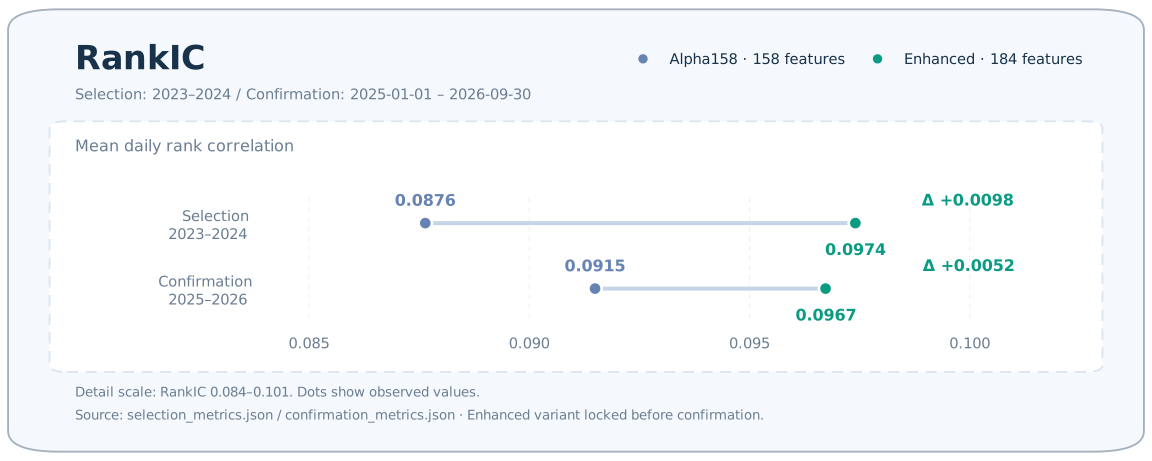
Confirmation-period RankIC rose from 0.0915 to 0.0967, an increase of 0.0052.
Top10 / Top20 / Top30
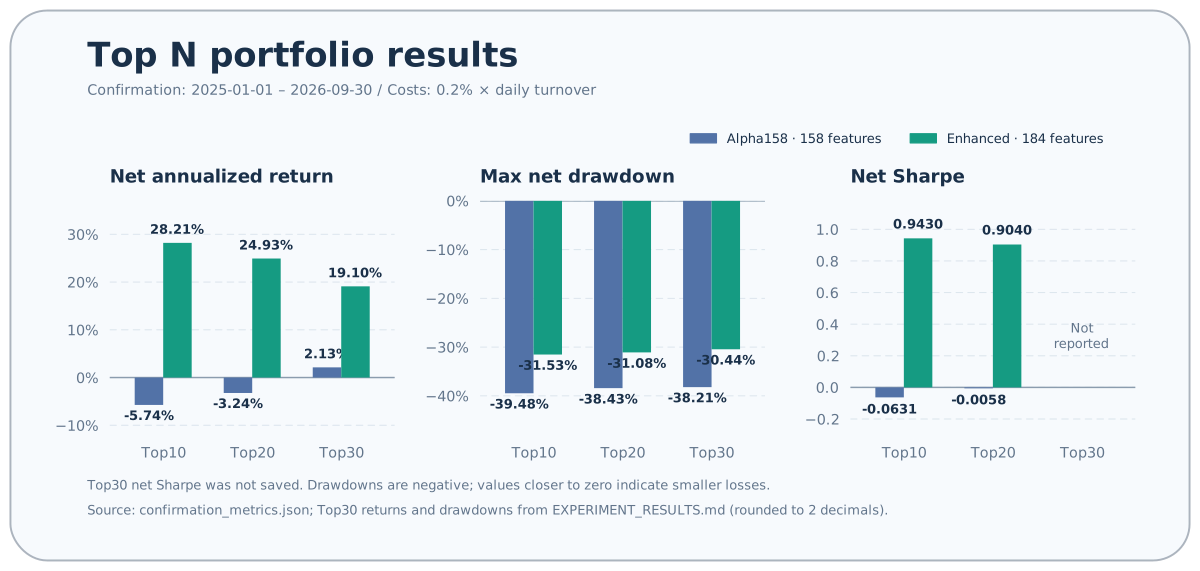
Confirmation-period Top10 / Top20 / Top30 net annualized returns rose from −5.74% / −3.24% / 2.13% to 28.21% / 24.93% / 19.10%, increases of 33.95 / 28.16 / 16.97 percentage points, with smaller maximum drawdowns. Top10 / Top20 net Sharpe improved; Top30 net Sharpe was not saved and is not recomputed in the chart.
The 95% intervals for confirmation-period daily RankIC differences and Top10 / Top20 daily net return differences all span zero. These intervals use same-day paired enhanced and baseline observations with a 20-trading-day circular block bootstrap (2000 resamples, random seed 42); they are not intervals for differences in annualized compounded returns. Enhanced Top1–3 returns also declined.
The backtest uses a closing-price execution proxy, delayed exits, and open positions carried at cost; returns are recognized on the actual exit date. It does not simulate after-hours order queues, partial fills, or daily unrealized profit and loss. Interpret the returns and drawdowns in light of these assumptions.
Development plan · Execution process · Complete results · Metrics and validation data · Backtest methodology
AxonX CLI commands and remote execution
CLI service commands call the corresponding Jobs. exec and plugin management commands without a specified target run in the current Python environment.
| Purpose | Example commands |
|---|---|
| Help / service version | axonx help / axonx version |
| Start the service | axonx start |
| List registered Tasks | axonx exec / axonx list_installed_task_definitions |
| Query a Task contract | axonx get_task_definition --task a158_etl |
| Execute in the current process | axonx exec --task demo --x 2 --y 3 |
| Submit a research task | axonx submit --task a158_train --source-tasks '<etl_task_id>' |
| Wait for this run | axonx wait_task --task-id '<task_id>' --run-id '<run_id>' --client-timeout 86400 |
| Follow progress and logs | axonx stream_task --task-id '<task_id>' --stream true |
| Query task list / status | axonx list_task_statuses / axonx status --task-id '<task_id>' |
| Read logs | axonx read_task_log --task-id '<task_id>' |
| Query context / dependency graph | axonx get_task_context --task-id '<task_id>' / axonx get_task_graph --task-id '<task_id>' |
| Cancel a task | axonx cancel --task-id '<task_id>' |
| Delete finished tasks and their files | axonx delete_tasks --task-ids '["<task_id>"]' |
| Browse the workspace | axonx list_entries --path '' |
| Preview an artifact | axonx preview_file --path '<workspace-relative-path>' |
| Query machines / resources | axonx list_machines / axonx machine_status |
| Query plugins / details | axonx plugin list / axonx plugin show axonx-alpha158 |
| Inspect / build plugin source | axonx plugin inspect ./plugins/a158 / axonx plugin build ./plugins/a158 |
| Install / uninstall a plugin | axonx plugin install ./plugins/a158 / axonx plugin uninstall axonx-alpha158 |
Connect directly to a remote service with the CLI
First install AxonX and research plugins on the target machine, configure its own AXONX_SERVICE_TOKEN, and start a reachable service. On the client, configure the target token and explicitly specify the address for commands that support remote access:
export AXONX_TARGET_TOKEN='your-target-service-token'
axonx machine_status --target 192.0.2.10:1024
axonx plugin list --target 192.0.2.10:1024
axonx submit --task demo --x 2 --y 3 --target 192.0.2.10:1024
axonx wait_task --task-id '<task_id>' --run-id '<run_id>' \
  --client-timeout 120 --target 192.0.2.10:1024
Replace the example address with your actual service. Use the same --target for submission, waiting, status, logs, and artifact queries; tasks use the target machine's plugins, data, and workspace. Direct CLI access does not require starting a local service.
Remote plugin installation builds a wheel locally, uploads it, and installs it in the target environment:
axonx plugin install ./plugins/a158 --target 192.0.2.10:1024plugin build always runs locally. Remote plugin inspect accepts a distribution or plugin name already installed on the target. start and exec do not execute remotely through --target.
Use remote machines in Studio
Configure the remote service address and token in the local .env:
# Optional: remote AxonX service for Studio
AXONX_TARGET=192.0.2.10:1024
AXONX_TARGET_TOKEN=your-target-service-token
Replace the example address with your actual service, then start with the built-in remote configuration:
axonx start --config remoteremote inherits the default configuration and adds the target address and token to the service's targets. Studio uses the local token to access the same-origin backend, which forwards requests to the selected remote service. For multiple targets, custom YAML, and connection troubleshooting, see the remote machines guide.
AxonX documentation
| Topic | GitHub Pages documentation |
|---|---|
| Installation and your first Task | Quick start |
| Browser operation | AxonX Studio |
| Component, Job, Task | Architecture · Framework extensions |
| Task contracts and lifecycle | Task contracts · Task management · Task lineage |
| Agent development and operations | External agents · Development guide · Agent configuration · MCP integration |
| Plugin development and deployment | Plugin management · Alpha158 · Alpha158 Enhanced |
| Quantitative research | Research workflow · Experiment design · Interpreting results · Interpreting backtests |
| Remote execution | Remote machines |
| CLI and configuration | CLI · Configuration |
Browse the complete Chinese documentation or English documentation.
Contributing
Bug reports, feature requests, documentation improvements, research plugins, and code contributions are welcome. Search existing issues first; see the contribution guide for development setup, directory conventions, and required checks.
Keep research algorithms in plugins/ and reuse framework extension points. Update both English and Chinese documentation when behavior changes. When contributing experiments, include data and time windows, parameters, cost definitions, and result materials that others can verify.
License
AxonX is released under the Apache License 2.0.