
Alpha158 Research Workflow
AxonX provides research task execution, records, artifacts, and Studio visualization. This page uses plugins/qlib_a158/, which adapts Microsoft Qlib’s Alpha158 baseline, as a concrete algorithm implementation, building a complete path from Tushare data to backtest results. The enhanced qlib_factor plugin uses separate qlib_factor_* registration names and adds training feature-group parameters. Both share research stages and basic artifact structures, but cross-plugin upstream reuse still requires checking Task definitions, feature order, and protocols. See the Qlib Factor for usage.
Before you start
- Complete the quickstart, with a working service token and connection.
- Install the qlib_a158 plugin in the service environment executing tasks. Installing it in the local CLI environment does not automatically change a remote machine's environment.
- Have Tushare history covering the training and prediction periods, plus necessary master data, in the workspace.
- Keep complete upstream research artifacts in the source workspace.
Run from the AxonX source checkout root (plugins are not published to PyPI):
axonx plugin install ./plugins/qlib_a158For local development use plugin install -e. Remote deployment requires local build, upload, target-side install and cleanup; --target alone does not transfer source. See Plugin management.
Restart the persistent service after installation or editable source changes to refresh its Task registration snapshot and cached definitions. Query the task catalog with axonx list_task_defs. Expect qlib_a158_etl, qlib_a158_analysis, qlib_a158_train, qlib_a158_predict, qlib_a158_backtest, and the parent Task qlib_a158_research.
What each research stage produces
| Stage | Registered name | Input source | Main results |
|---|---|---|---|
| Download | download_tushare_task | Tushare API | Raw partitions in workspace tushare/ |
| ETL | qlib_a158_etl | Raw partitions and master data | alpha158.parquet, statistics CSV |
| Factor analysis | qlib_a158_analysis | One ETL Task | Factor diagnostics and quantile return CSV |
| Training | qlib_a158_train | One ETL Task | LightGBM model, importance, validation history |
| Prediction | qlib_a158_predict | One Train Task | Full cross-sectional prediction Parquet |
| Backtest | qlib_a158_backtest | One Predict Task | Daily and summary Parquet |
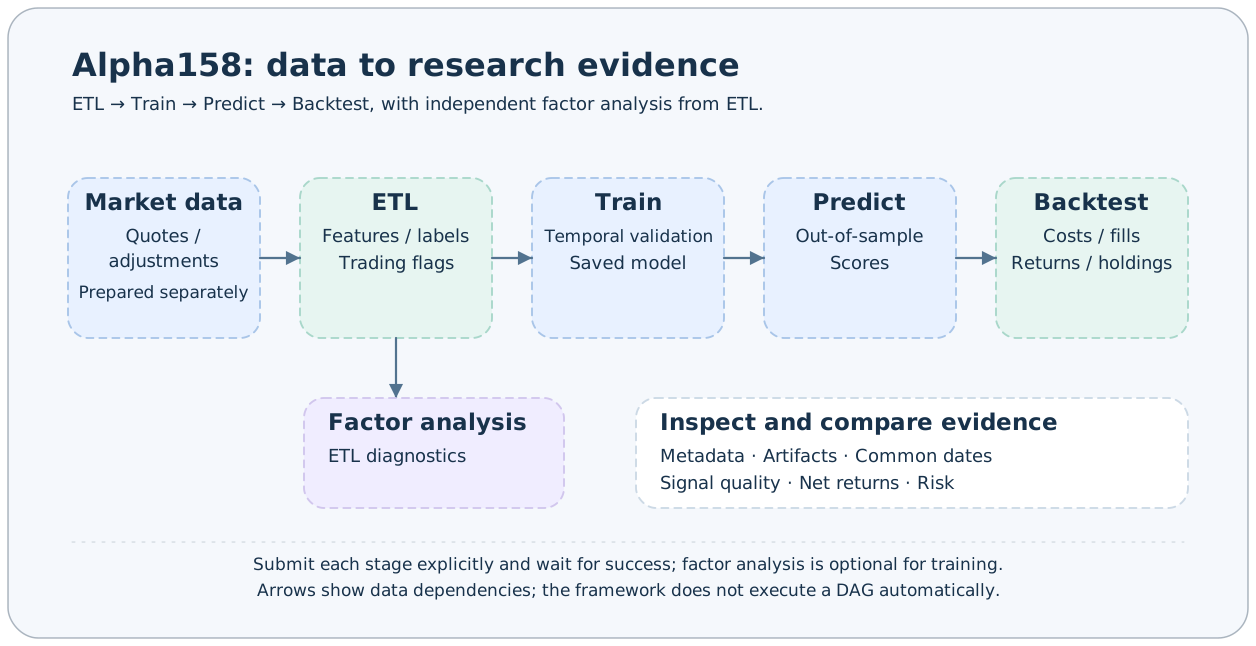
Factor analysis is an independent downstream stage of ETL; training does not depend on its success. Prediction uses an explicitly declared ETL upstream when present, otherwise resolves it through training metadata. It snapshots the verified model collection and pins the selected dataset; retain the source records and artifacts for reproducibility.
Execute and verify a stage
Choose an explicit instance name when you need a predictable Task ID:
axonx exec --task qlib_a158_etl --task-name experiment --start-date 20150101
axonx status --task-id 'etl#qlib_a158_etl#experiment' --detail full
Exec waits for completion, prints business output and returns the Task exit code. Retain Task ID, started_at and input/artifact revisions from metadata. Pass the ID downstream only after checking success. For observations in another terminal, use wait_task with the Task ID; it rejects a restart during the wait. A dropped remote command connection requires inspecting metadata before retrying.
From ETL to out-of-sample prediction
# After ETL succeeds, factor analysis can run independently
axonx exec --task qlib_a158_analysis --upstream-task-ids '["<ETL Task ID>"]'

# The training end date is excluded from the training interval
axonx exec --task qlib_a158_train --upstream-task-ids '["<ETL Task ID>"]' \
  --train-start 20150101 --train-end 20230101 \
  --label-column label_return_rank

# After training succeeds, prediction must start no earlier than train_end
axonx exec --task qlib_a158_predict --upstream-task-ids '["<Train Task ID>"]' \
  --pred-start 20230101 --pred-end 20231231

# After prediction succeeds, generate backtest artifacts
axonx exec --task qlib_a158_portfolio --upstream-task-ids '["<Predict Task ID>"]'
axonx exec --task qlib_a158_backtest --upstream-task-ids '["<portfolio_task_id>"]' --buy-cost-rate 0.0005 --sell-cost-rate 0.0015
Each exec waits. Check its exit code and metadata before the next stage. upstream_task_ids is a JSON array in both CLI and Python inputs. Validate each stage against its actual definition.
Training reserves the final dates in trading-day order for validation, with a default validation ratio of 10%. Validation and early stopping first select the iteration count, then all valid samples in the training window fit the final model. Saved training curves come from tuning; they are not the final model's performance on an independent test set.
Data scope and label boundaries
By default, ETL outputs available data from 20140101, while rolling features read earlier history. Downloading the latest 7 calendar days cannot support multi-year training or complete rolling windows.
qlib_a158 publishes independent feature, raw-label, market, and calendar artifacts. Labels use the next market date at the same time; suspension or missing data invalidates that fixed-day return without extending its horizon. Training excludes label target dates at or beyond the exclusive cutoff and computes rank/CSZ targets after sample filtering. Prediction retains the full cross-section without joining labels. Backtesting selects signal-day candidates and values actual positions each market day; blocked exits retain capital.
The default training target label_return_rank is a cross-sectional rank label. Prediction pred is a model score and cannot be interpreted directly as a return or probability of a price rise.
Viewing results in Studio
See interpreting results for complete Studio 0.3.0 screenshots by stage. Data processing, Factor analysis, Model training, and Offline prediction views show dates, metrics, and artifacts. Screenshots use Playground's synthetic data to illustrate the UI; they are not results of this page's commands.
Open Data processing, Factor analysis, Model training, Offline prediction, and Offline backtest in order and select the corresponding tasks. Research lists read metadata.json from successful tasks. Use the task page for status and logs of running tasks.
The recommended reading order is data processing dates, rows, and feature columns; training validation details; prediction coverage; then backtest protocols, costs, and returns. See strategy comparison for comparisons between strategies.
From executing a chain to designing an experiment
A completed execution provides parameters and artifacts. Evaluating improvements also requires controls, ablations, screening, and independent confirmation. Plan comparisons with experiment design and confirmation, then inspect common windows with strategy comparison. See Qlib Factor for the agent-developed feature case and reproduction guide.
Running the research Task
Install the plugin and prepare historical data, then configure each stage through nested inputs:
axonx get_task_def --task qlib_a158_research
axonx exec --task qlib_a158_research --task-name pipeline-01 \
  --etl.start-date 20150101 --train.train-end 20230101 \
  --predict.pred-end 20231231 --portfolio.top-ns '[20,30]'
The parent owns child instance names and upstream_task_ids, runs ETL → Train → Predict → Portfolio → Backtest, and returns stage_task_ids. Set --analysis '{}' to add factor analysis after ETL; it is disabled by default. predict.pred_start defaults to train.train_end. Nested stage names, dependencies and explicit backtest input-file overrides are rejected; use leaf Tasks to reuse existing upstreams. Children share the parent process and inherit its name. See Composing Tasks.
Common failures and actions
| Symptom | First checks |
|---|---|
| Registered name does not exist | Plugin environment and restart status of the execution service |
| Missing daily, adj_factor, or master data | tushare/ partitions and static files |
| No valid labels in the training interval | ETL dates, trading status, exit labels, and training boundaries |
| Prediction starts before training ends | pred_start and metadata train_end_exclusive |
| Model validation fails | Whether the model file in the training directory was replaced |
| Backtest fields are missing | Whether prediction artifacts match the qlib_a158 protocol |
Lineage graphs record explicit upstream relationships. They do not automatically schedule, fill in, or rerun the research chain. Rerunning with a fixed task_name replaces the directory record of a finished task; use different names and retain artifacts when comparing experiments.