
Task Dependencies and Lineage
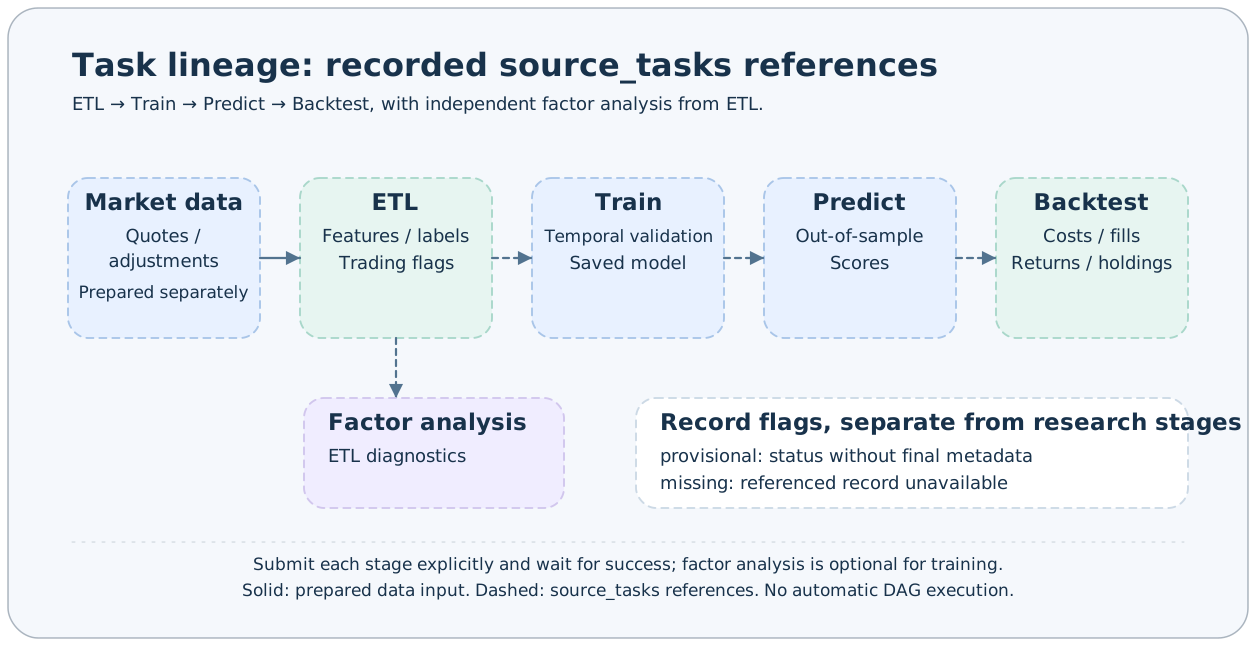
AxonX uses source_tasks to record which upstream Tasks a task references. Lineage graphs help trace relationships between data, models, predictions, and backtests; each stage still requires explicit submission and confirmation of completion.
Passing Upstream Identities
All BaseInputParams have source_tasks, a string of Task IDs separated by commas:
{
  "task_name": "prediction-01",
  "source_tasks": "etl#my-etl#dataset-01,train#my-train#model-01"
}
This is a string, not a JSON array or file path. Parsing validates Task ID format and normalizes the content. Plugins can also use source_task(TaskType.TRAIN) to require exactly one upstream Task of a specified type; missing or multiple matches raise errors.
The following only illustrates parameter combinations. my-predict is an example registered name; first substitute the actual definition and required parameters from an installed plugin:
axonx get_task_definition --task '<registered name of an installed prediction Task>'
axonx submit --task '<registered name of an installed prediction Task>' \
  --task-name prediction-01 \
  --source-tasks 'etl#my-etl#dataset-01,train#my-train#model-01'
The base protocol validates ID format, but does not verify that upstream directories exist, that runs succeeded, that data definitions agree, or that a model is applicable. Each Task should validate required files and metadata when reading them.
Where the Graph Comes From
A successful Task's metadata.input_params.source_tasks is the final source of relationships. For tasks without successful metadata, queries use status.config.source_tasks to generate provisional relationships.
| Field | Explanation |
|---|---|
| parent_ids | Upstream Task IDs declared by the current node |
| provisional=true | A status record exists, but final metadata does not yet exist |
| missing=true | An upstream task is referenced, but has no valid workspace record |
| state | Execution state when status exists; may be empty |
| edges.from / edges.to | Direction from upstream to downstream |
Graph queries return the connected component containing the selected task, including upstream and downstream nodes, rather than only direct parents. root_id is a root identifier in the graph, not a scheduling instruction for what to execute next.
Querying and Inspecting
axonx get_task_graph --task-id 'predict#my-predict#prediction-01'
axonx get_task_context --task-id 'predict#my-predict#prediction-01'
Studio's task lineage entry lets you select nodes, inspect related tasks, and navigate to results. To confirm a node precisely, inspect its status, metadata, and artifacts; an edge only shows that a reference was recorded.
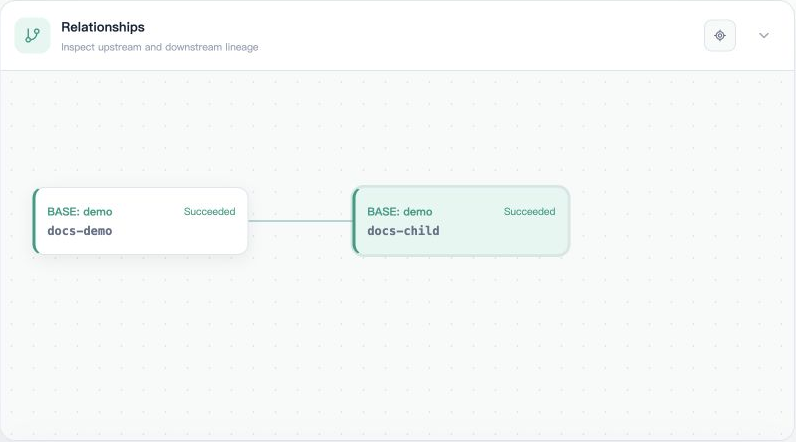
The following uses two built-in demo tasks to illustrate the records. The parameter snapshot for docs-child explicitly sets source_tasks=base#demo#docs-demo while using its own x=5 and y=5.
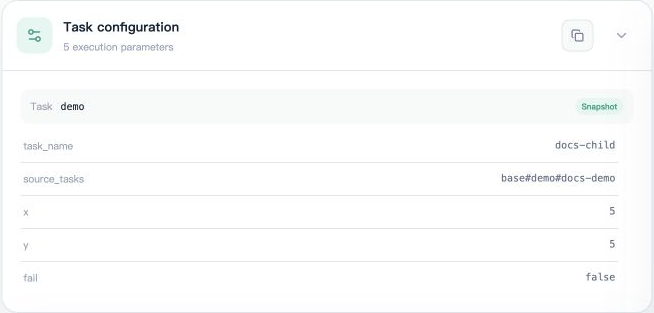
The Relationships section therefore shows docs-demo → docs-child. This traceability relationship results from the user submitting two Tasks separately. The demo calculation uses only its own x/y; source_tasks does not automatically read upstream results or schedule downstream execution.
When investigating backtest anomalies, usually work upstream from Backtest to Predict dates, then Train model configuration, and finally the ETL data window. The same registered name does not imply the same configuration, and the same type does not imply the same data version.
Reading Upstream Tasks in Plugins
from axonx.enums import TaskType

train_id = self.input_params.source_task(TaskType.TRAIN)
train_dir = self.source_task_dir(train_id)
source_task_dir() locates that Task's directory in the local workspace. It does not automatically download upstream tasks from a remote machine or execute unfinished tasks. Read artifacts using relative paths from metadata and verify that files exist.
Before executing downstream tasks on another machine, explicitly place the required terminal upstream directories on the execution machine and install compatible plugins. Passing upstream IDs to a remote service does not migrate their artifacts.
Effects of Naming and Deletion
Rerunning a fixed name reuses the Task ID and replaces its directory. Existing downstream tasks still reference the same ID, but upstream content may have changed. For traceable experiments, use distinct instance names and retain parameters and artifact checksums.
After upstream deletion, downstream records may remain, with missing nodes in the graph. Deletion does not cascade to all descendants or guarantee that descendants can rerun. Before cleaning up experiments, inspect connected relationships and back up results you need to reuse.
Self-references do not create valid graph edges; invalid relationships may be ignored during tolerant reads. Do not treat the lineage graph as a complete research logic validator or a cycle detection report.
Related Documentation
Task Management · Research Workflow · Workspace · Task Contracts
Source: source_tasks rules, Input models, Relationship graph.