
Jobs and Tasks
A Job is an asynchronous capability call within an AxonX Application; a Task is a synchronous execution unit with typed input and output. Each has its own step abstraction: a Job Step is an asynchronous capability step, while a Task Step is a synchronous function called sequentially.
Comparison
| Question | Job | Task |
|---|---|---|
| How is it found? | A Job name in configuration, such as submit | A registered name, such as demo |
| How does it execute? | Dispatcher validates it, then executes asynchronous Steps | TaskRunner executes synchronous callables sequentially |
| Input contract | The Job's JSON Schema and defaults | Pydantic input_cls |
| Output contract | JobResponse and optional events | Pydantic output_cls and metadata |
| Lifecycle | From the start of a call to its response | queued, running, terminal states, and persistent records |
| Long-running execution | Can wait for components or external I/O | submit usually runs in a separate worker |
Here, “synchronous” means a function must execute and return directly: it cannot be declared with async def or return an awaitable. Background Task execution comes from TaskManager starting a process, rather than making Task Steps asynchronous.
From Names to Execution Identity
axonx get_task_definition --task demo
axonx submit --task demo --task-name add-check --x 1 --y 2
In this call:
submitis the Job name.demois the registered Task definition name used to resolve the class and schema.add-checkis the instance name specified by the user.base#demo#add-checkis the Task ID, corresponding to a workspace directory.run_ididentifies this execution and is provided by the returned TaskHandle.
A Task ID is not the value passed to --task. To query an instance that has run, use status --task-id; to query an executable definition, use get_task_definition --task.
What submit Returns
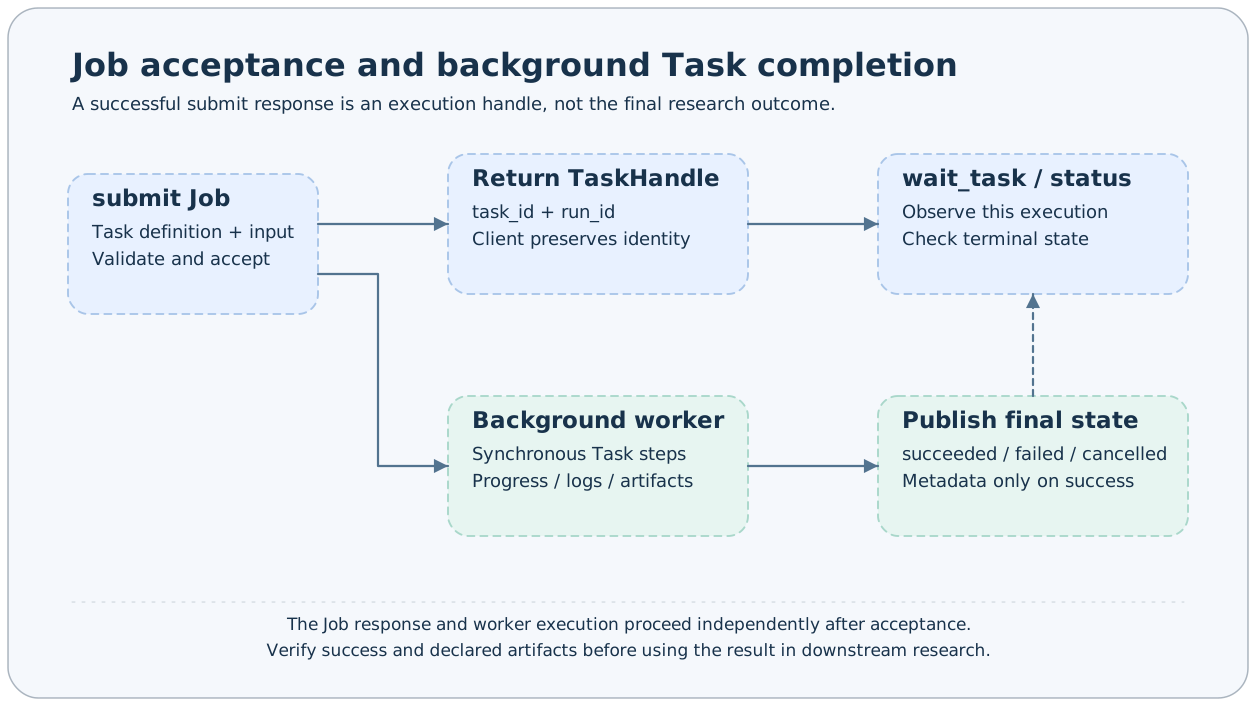
The key part of a typical response is shown below; run_id is illustrative:
{
  "success": true,
  "answer": {
    "task_id": "base#demo#add-check",
    "run_id": "a9f248807a0a496abf3738422b379a51",
    "task": "demo"
  }
}
This means the Job has accepted and submitted the Task. The research logic can still fail. For example, submission of demo --fail true can succeed, but the worker will later raise an exception and finish as failed.
Save the complete handle, then wait using both identities:
axonx wait_task --task-id 'base#demo#add-check' \
  --run-id '<run_id returned by submit>' --client-timeout 600
wait_task returns the terminal status, with success true only when the Task is succeeded. Rerunning a fixed name changes run_id; waiting with the old ID will not silently treat another execution as the original task.
exec and submit
# Run in the current CLI process; no HTTP service needs to be started first
axonx exec --task demo --x 1 --y 2

# An existing service accepts the task and starts a worker on its machine
axonx submit --task demo --x 1 --y 2
exec suits plugin debugging, one-off scripts, and parameter checks. submit suits background research initiated from Studio or an API and supports waiting, cancellation, and queries through TaskManager.
Both use Task input/output contracts and workspace records. exec does not add the current process to another persistent service's worker management list; do not rely on that service to cancel this CLI process.
Choosing an Abstraction for New Capabilities
For model training, data transformation, or backtesting that needs artifacts and experiment identity, usually implement a Task. Implement build_task_steps() and build_output_params() and inherit an appropriate research contract.
For querying status, connecting to remote services, calling existing components, or combining capabilities into a public interface, usually implement a Job with asynchronous Steps. A Job can also explicitly call submit, wait for results, then execute subsequent steps; this requires custom orchestration logic.
Do not replace a Task with a Job solely to achieve background execution, or create a new research Task for every status query.
Related Documentation
Task Lifecycle · Task Management · Task Contracts · Existing Development Guide
Source: BaseTask, submit and wait Steps, Job models.