
Task Identity and Lifecycle
A Task ID identifies a task directory in the workspace; run_id identifies one execution. Submission acceptance, a terminal execution state, and publication of successful artifacts are separate stages. To determine the outcome correctly, save the handle returned by submission and check the final status.
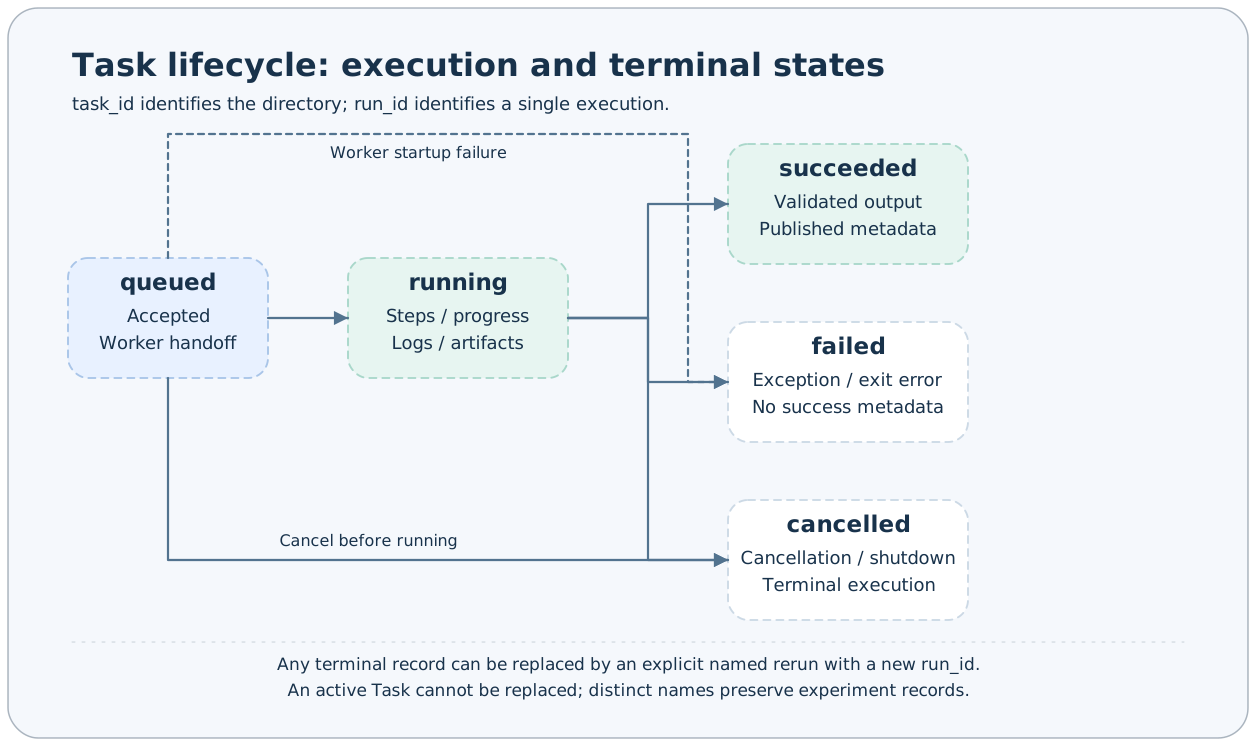
Three Names and One Execution Identifier
| Field | Meaning | Example |
|---|---|---|
| Registered Task name | Finds the definition and input schema | demo |
| input.task_name | Instance name specified by the user | trial-01 |
| task_id | Combination of type, registered name, and instance name | base#demo#trial-01 |
| run_id | Identifier generated independently for each execution | UUID hexadecimal string |
task_name allows 1–32 English letters, digits, or hyphens. If omitted or passed as an empty string, the framework uses a name with an hourly timestamp prefix and random suffix. Keep the # characters in Task IDs and quote them in the shell.
The task_name field in persistent status currently stores the registered Task name. The instance name is in status.config.task_name and metadata.input_params.task_name. Do not infer the directory suffix from this top-level status field.
State Meanings
| state | Meaning | Terminal? |
|---|---|---|
| queued | Accepted, awaiting worker handoff or execution | No |
| running | Executing synchronous steps | No |
| succeeded | Steps and output completed; exit code is 0 | Yes |
| failed | Exception, nonzero exit code, or abnormal worker exit | Yes |
| cancelled | Stopped by cancellation or manager shutdown | Yes |
The typical transition is queued → running → succeeded. Both queued and running can transition to cancelled; step exceptions, output validation failures, or nonzero exits can lead to failed.
submit does not implement a resource queue scheduler: queued is an acceptance and handoff state, so it does not imply scheduling by GPU, priority, or quota.
Step Progress
The steps field in status stores the name, start/end times, and percentage of each step that has started. A Task can call report_progress(percentage) within a step:
- The value must be between 0 and 100.
- Progress cannot go backward within the same step.
- Normal step completion automatically records 100.
- A failed step has an end time, but may not reach 100.
The step generator can dynamically yield subsequent steps based on intermediate state, so the current number of steps may not be the final total. “Executed steps / current step count” is not a reliable overall task percentage.
Publication Order for Successful Records
Normal successful execution completes these operations in order:
- All synchronous steps return.
build_output_params()returns an instance of the correct output_cls.- Output and exit code are obtained; metadata is written when the exit code is 0.
- The succeeded status is published.
Metadata is therefore already written before the successful status is published. Failed or cancelled tasks usually have only status, progress events, and partial artifacts, without successful metadata. Studio research lists locate results through metadata, so appearing in the task list does not imply appearing on research pages.
Rerunning a Fixed Name
axonx submit --task demo --task-name trial-01 --x 1 --y 2
# Submit the same experiment name only after the previous run reaches a terminal state
axonx submit --task demo --task-name trial-01 --x 2 --y 3
A fixed name corresponds to the same Task ID. A new execution can replace a finished task: the old directory and its artifacts are deleted and recreated. An active task cannot be overwritten.
Use different names such as trial-01 and trial-02, or generated default names, when comparing experiments with different parameters. Rerunning the same name does not preserve a complete history in one directory; recovery requires a prior backup.
Waiting and Cancellation
wait_task requires task_id and run_id to avoid reading another execution's result after a directory has been reused. stream_task continuously follows status and logs by Task ID and suits live observation; keep the handle when you need to confirm a specific execution's identity.
axonx status --task-id 'base#demo#trial-01'
axonx cancel --task-id 'base#demo#trial-01'
Cancellation affects active workers known to the current manager. If a task finishes quickly, cancellation may return false; this is normal under a race condition. Service shutdown also stops its managed workers and records affected runs as cancelled.
File records can restore query information, but cannot automatically restore the in-memory state of an interrupted Python process.
Related Documentation
Task Management · Workspace · Logs and Recovery · Task Contracts
Source: Identity rules, TaskRunner, TaskManager.