
API protocol overview
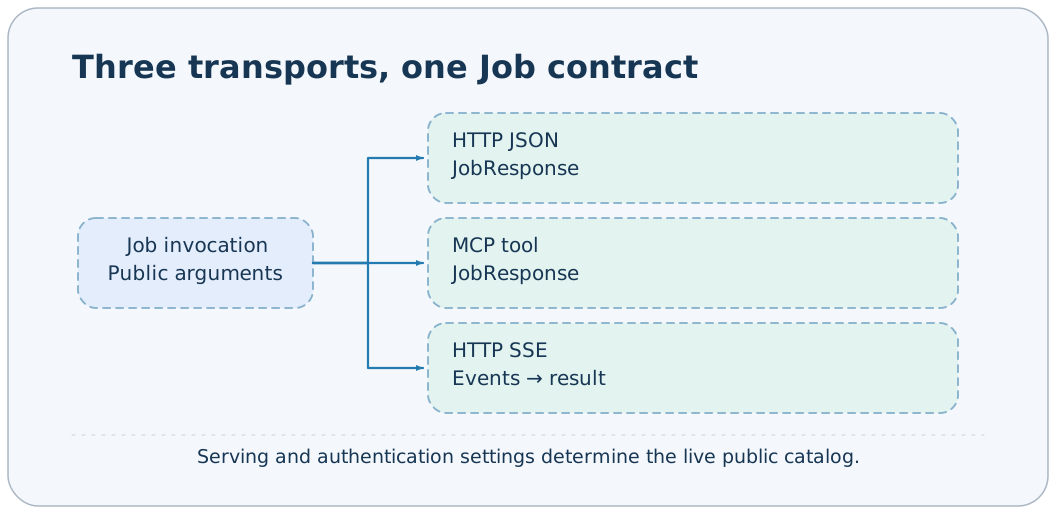
AxonX exposes Jobs through ordinary HTTP JSON, HTTP SSE, and MCP tools. All three share business Schemas and JobResponse; consult the capability pages for Task, Agent, and file-operation parameters. The service must be running; confirm its token and actual public catalog before calling it.
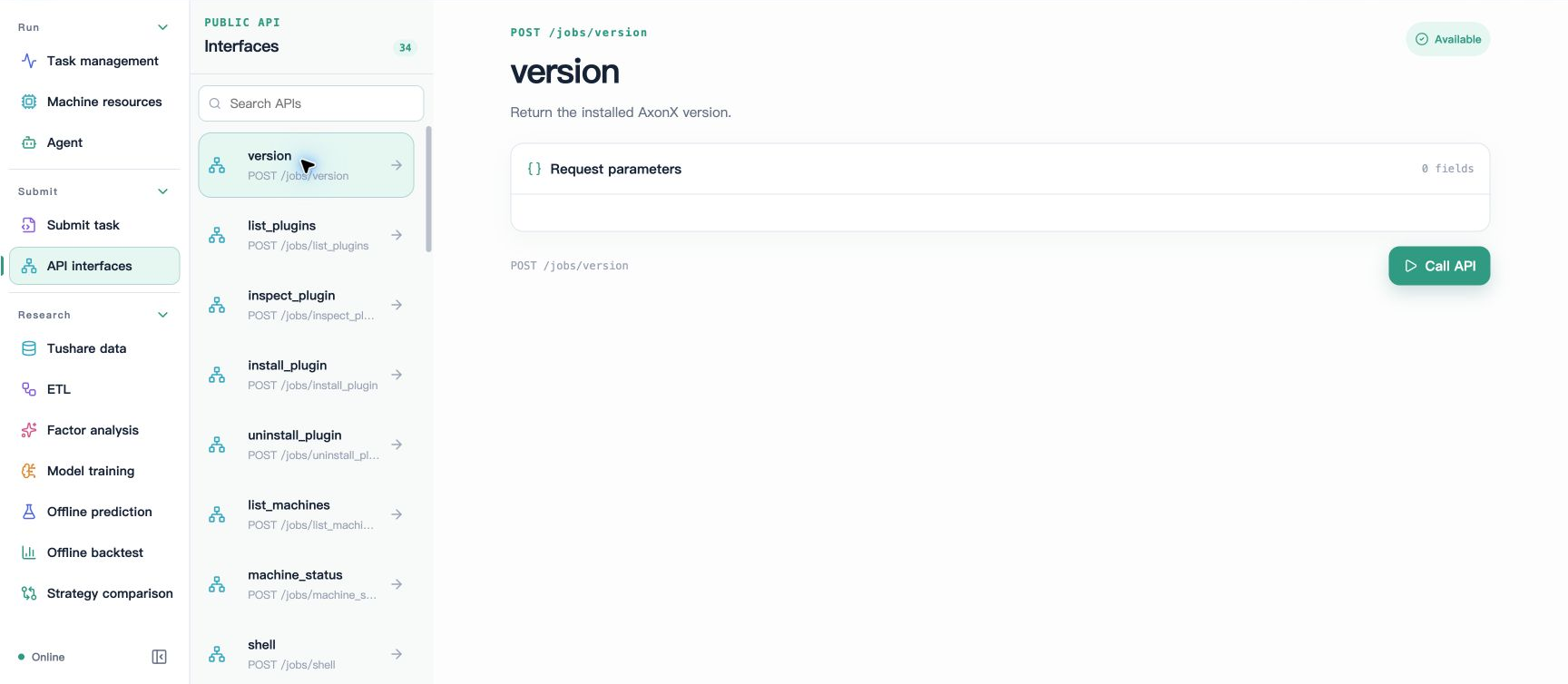
Studio's API interfaces displays Jobs exposed by the current machine and generates forms from their parameter Schemas. No call has been made in the illustration above; see Getting started with Studio for a complete call response.
Routes
| Method | Path | Purpose | Successful response |
|---|---|---|---|
| GET | /health | Whether the current Application is running | JobResponse, answer.running |
| GET | /jobs | Actual public Job catalog | JobResponse, answer.items/total |
| POST | /jobs/{name} | Ordinary call | JobResponse |
| POST | /jobs/{name}/events | Live events | text/event-stream, ending with result |
| POST | /files | Upload raw bytes to staging | JobResponse, with FileCopy in answer |
| DELETE | /files?path=... | Clean up staged files | JobResponse, answer.path |
| MCP | /mcp | Streamable HTTP tool interface | MCP containing JobResponse |
| Multiple HTTP methods | /proxy/{name}/{path} | Configured upstream proxy | Upstream response |
All business requests execute on the current service by default. GET /jobs?target=http%3A%2F%2Fnode-b%3A1024 queries a configured target's catalog; target in Job requests follows the same configuration-matching rules. proxy is a separate upstream-forwarding capability; see HTTP proxy.
Authentication and the public catalog
When service.token is configured, both the root paths and subpaths of /health, /jobs, /files, and /mcp require:
Authorization: Bearer your-service-tokenOPTIONS requests skip this check. Studio's static pages and /proxy are outside these protocol-protected root paths; proxy uses the upstream request's credentials. requires_auth=false does not bypass a configured service token.
Two conditions determine which Jobs are public:
enable_serve=true.- The service has a token configured, or the Job has
requires_auth=false.
Jobs default to requires_auth=true, so without a token in the default configuration, you cannot assume every default Job appears in the catalog. Jobs with enable_stream=false accept ordinary calls, but local /events returns 404. Restart the service after changing configuration; the catalog is determined when the HTTP application is built.
Request envelope
{
  "arguments": { "task": "demo", "x": 1, "y": 2 },
  "target": "http://node-b:1024"
}
arguments is the business-parameter dictionary, defaulting to {}; target is optional and defaults to local execution. The envelope rejects additional top-level fields. target must be listed in this service's targets. The service configuration stores the remote token; the browser submits only the address.
CLI --target instead connects directly to the address using the client's own token, without requiring this service's targets. MCP tools receive only Job business parameters, without the HTTP target envelope described above.
Minimal calls
Assume the service address is http://127.0.0.1:1024 and the token is stored in AXONX_SERVICE_TOKEN.
curl -s http://127.0.0.1:1024/health \
  -H "Authorization: Bearer $AXONX_SERVICE_TOKEN"

curl -s http://127.0.0.1:1024/jobs \
  -H "Authorization: Bearer $AXONX_SERVICE_TOKEN"

curl -s -X POST http://127.0.0.1:1024/jobs/version \
  -H "Authorization: Bearer $AXONX_SERVICE_TOKEN" \
  -H 'Content-Type: application/json' \
  -d '{"arguments":{}}'
Health response:
{ "answer": { "running": true }, "success": true, "metadata": {} }The catalog returns JobCatalog. Only one item is shown below to illustrate the field structure; the actual Schema is more complete:
{
  "answer": {
    "items": [
      {
        "name": "version",
        "description": "Return the installed AxonX version.",
        "input_schema": { "type": "object", "properties": {} },
        "output_schema": { "type": "object" }
      }
    ],
    "total": 1
  },
  "success": true,
  "metadata": {}
}
output_schema describes the shared JobResponse and does not guarantee that every capability-specific answer type is modeled separately. Task definitions' output_schema is supplied separately by the task-catalog endpoints.
Responses and errors
| Field | Type | Default | Explanation |
|---|---|---|---|
| answer | Any JSON-serializable value | "" | Business answer or error text |
| success | boolean | true | Final business outcome of the Job |
| metadata | object | {} | Additional information; the Agent provides session_id and related values here |
{ "answer": "KeyError: 'base#demo#missing'", "success": false, "metadata": {} }This is an example of a business failure within HTTP 200. Clients must check both the HTTP status and success; a 200 alone is insufficient.
| HTTP status | Common trigger | Response and handling |
|---|---|---|
| 401 | Missing or mismatched token | {"detail":"Invalid bearer token"}; check the connection target and token source |
| 404 | Job is not public, name is unknown, or streaming is disabled | {"detail":"Unknown job"}; query the catalog again |
| 422 | Invalid request envelope, parameter Schema, or target configuration | detail text or FastAPI validation details; revise the request |
| 502 | Connection or protocol failure in an ordinary remote call | detail text; check remote health and credentials |
| 413 | Upload exceeds the size limit | detail text; reduce the artifact size |
| 409 | Staging destination conflict | detail text; inspect staged content and symbolic links |
Exceptions within executing Steps usually become success=false. After a streaming call starts, exceptions become failed result events and can no longer be represented by HTTP status. A stream that disconnects without a terminal result is not successful.
MCP and events
MCP automatically registers tool names, descriptions, and parameters for public Jobs; tools return ordinary JobResponse. MCP's Streamable HTTP is a transport mode and does not replace the AxonX SSE event protocol at /jobs/{name}/events. Live task logs, Agent thinking, and tool blocks use the Event protocol.
File uploads do not pass bytes directly through Job arguments or MCP tools; first use the file-transfer routes.
Related documentation
Implementation references: axonx/constants.py, components/service/http/app.py, jobs.py, files.py, components/job/contracts.py.