
Machine API
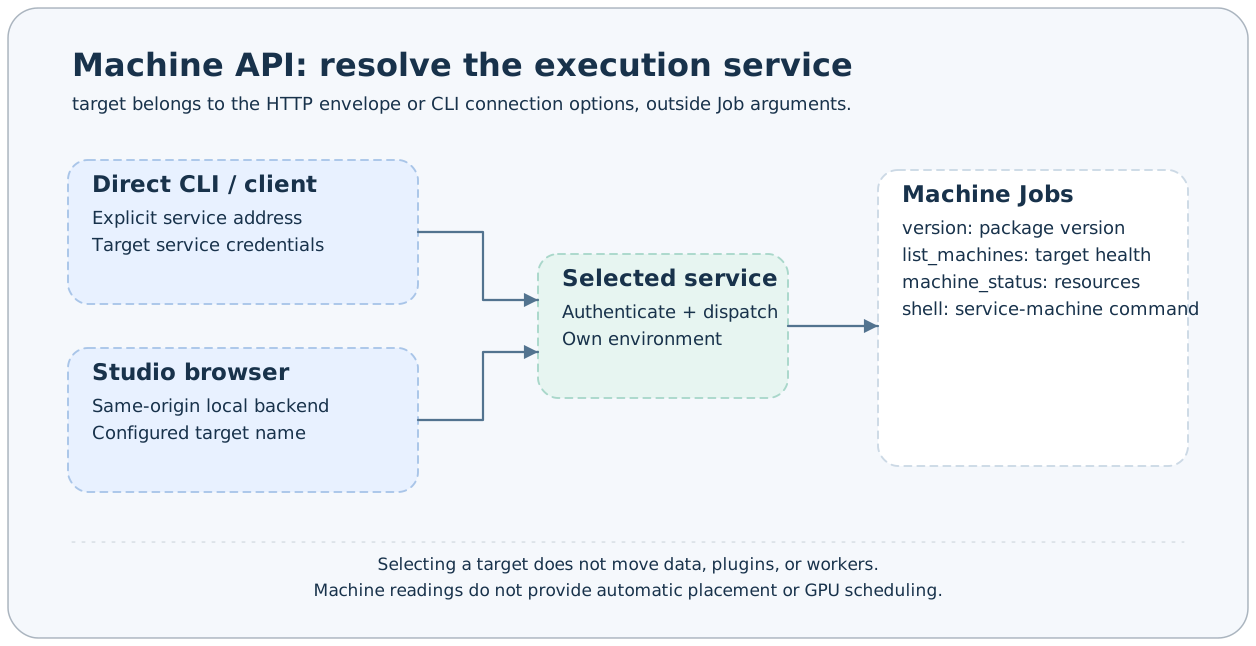
Query versions, the health of configured targets, and machine resources, or execute commands on the selected service machine. target belongs to the HTTP request envelope or CLI connection options, rather than these Jobs' business fields.
Calling conventions
All endpoints below use POST /jobs/{name} with a {"arguments":{...}} request body. For remote forwarding, add target at the envelope's top level, outside arguments. Every response uses JobResponse. Table defaults come from the current built-in configuration and Steps. Deployments may change Job Schemas; the running service's /jobs is authoritative.
All JSON examples illustrate structure; replace task IDs, session IDs, file paths, and hashes with values actually returned by your service. See Task contracts for the complete shared TaskStatus fields.
Endpoint list
| Job | Purpose |
|---|---|
version | Read the installed package version. |
list_machines | Check the health of all configured targets. |
machine_status | Sample service-machine resources. |
shell | Execute a shell command on the selected service machine. |
version
Read the installed package version.
No public business parameters; use {"arguments":{}}.
Request
{
  "arguments": {}
}
Response
answer is a version string; metadata.version also provides that version.
{
  "answer": "0.1.0",
  "success": true,
  "metadata": { "version": "0.1.0" }
}
Behavior and failure cases
The version value is only an example; use machine_status to inspect build branch/commit information.
list_machines
Check the health of all configured targets.
No public business parameters; use {"arguments":{}}.
Request
{
  "arguments": {}
}
Response
answer is an array of MachineHealth, each containing address and healthy.
{
  "answer": [
    {
      "address": "http://node-b:1024",
      "healthy": true
    }
  ],
  "success": true,
  "metadata": {}
}
Behavior and failure cases
The default targets=[] produces an empty result. healthy=false may indicate a network, token, or service problem; it does not imply insufficient resources.
machine_status
Sample service-machine resources.
No public business parameters; use {"arguments":{}}.
Request
{
  "arguments": {}
}
Response
answer is MachineInfo: axonx, cpu, memory, and gpus.
{
  "answer": {
    "axonx": {
      "version": "0.1.0",
      "git_commit": null,
      "git_branch": null
    },
    "cpu": {
      "total_cores": 8,
      "physical_cores": 4,
      "usage_percent": 12.0
    },
    "memory": {
      "total_bytes": 16000000000,
      "used_bytes": 4000000000,
      "available_bytes": 12000000000,
      "usage_percent": 25.0
    },
    "gpus": []
  },
  "success": true,
  "metadata": {}
}
Behavior and failure cases
The cpu fields total_cores/physical_cores may be null; memory is measured in bytes. GPU vendor is limited to nvidia/amd. The list may be empty when detection commands are unavailable or no devices exist; Apple GPU detection is not guaranteed.
shell
Execute a shell command on the selected service machine.
| Parameter | Type | Required | Default | Constraints and meaning |
|---|---|---|---|---|
command | string | Yes | — (omitted) | Shell command to execute on the target service machine; minLength=1 |
timeout | number | No | 30 | Command timeout in seconds; exclusiveMinimum=0, maximum=300 |
Only the business fields listed in the table are accepted.
Request
{
  "arguments": {
    "command": "pwd",
    "timeout": 30
  }
}
Response
answer is ShellOutput: stdout, stderr, exit_code, stdout_truncated, and stderr_truncated. success depends on whether the command timed out and whether its exit code is zero.
{
  "answer": {
    "stdout": "/srv/axonx\n",
    "stderr": "",
    "exit_code": 0,
    "stdout_truncated": false,
    "stderr_truncated": false
  },
  "success": true,
  "metadata": {}
}
Behavior and failure cases
Each output stream retains at most 1 MiB. A timeout kills the process group, sets exit_code=null, includes a timeout explanation in stderr, and sets success=false. Subprocesses run with the service user's permissions; machine-status queries do not automatically select a machine.
Failure response examples
A nonzero shell exit or timeout is a business failure returned through the normal protocol. For command="exit 3":
{
  "answer": {
    "stdout": "",
    "stderr": "",
    "exit_code": 3,
    "stdout_truncated": false,
    "stderr_truncated": false
  },
  "success": false,
  "metadata": {}
}
On timeout, exit_code=null and stderr includes Command timed out after ... seconds. timeout=0 or timeout>300 returns HTTP 422 during Schema validation. One target with healthy=false in list_machines does not automatically fail the entire query; interpret each machine's result separately.
Related documentation
Implementation references: axonx/config/default.yaml, axonx/steps/machine/ and axonx/components/service/http/jobs.py.