
SSE Event protocol
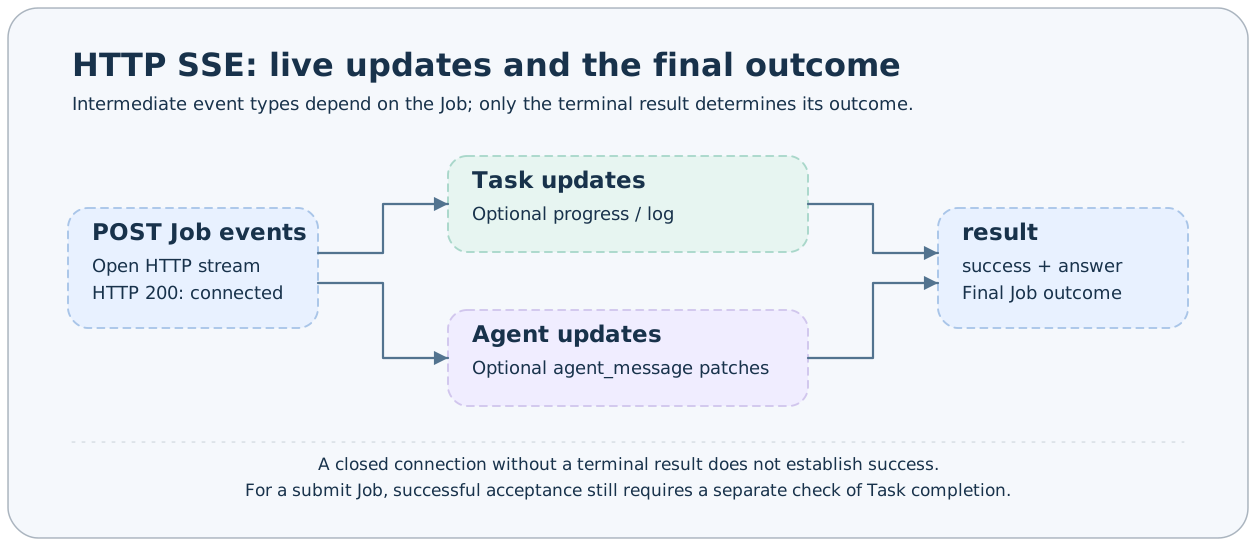
Use POST /jobs/{name}/events to consume live progress, logs, artifacts, or Agent messages from a single Job invocation. Keep reading after connecting, stop when result arrives, and determine the outcome from its success field.
Connection and framing
The request envelope and authentication match ordinary HTTP. A successful response has Content-Type text/event-stream. Each event's event line equals kind; data is a single-line JSON value, followed by a blank line:
event: progress
data: {"kind":"progress","name":"submitted","started_at":null,"finished_at":null,"percentage":100.0}

event: result
data: {"kind":"result","answer":{"task_id":"base#demo#example","run_id":"f5caee3a7b3c40849d0fb3bdc0f0cd23","task":"demo"},"success":true,"metadata":{}}
The example above acknowledges acceptance by the submit Job; it does not indicate that demo has completed successfully. Use stream_task to follow a background Task; its final result.answer is the terminal status.
curl -N -X POST http://127.0.0.1:1024/jobs/stream_task/events \
  -H "Authorization: Bearer $AXONX_SERVICE_TOKEN" \
  -H 'Content-Type: application/json' \
  -d '{"arguments":{"task_id":"base#demo#example"}}'
Native EventSource only supports GET and cannot directly construct this protocol's POST request with Authorization. Browsers should use fetch and stream reading; Studio already implements the corresponding decoding.
Event types
progress
| Field | Type and default | Meaning |
|---|---|---|
| kind | "progress" | Discriminator field |
| name | Nonempty string | Step/progress name |
| started_at / finished_at | datetime or null | Timestamps; default null |
| percentage | number or null | 0–100; default null |
progress may update the same name multiple times. A single step's percentage is not the percentage of the entire research chain.
log
| Field | Type and default | Meaning |
|---|---|---|
| content | string, empty string | Decoded text |
| start_offset / next_offset | integer, 0 | Byte offsets for the start of this chunk and the next read |
| file_size | integer, 0 | Known log file size |
| has_more_before / has_more_after | boolean, false | Whether more content exists before/after the window |
| reset | boolean, false | Log reset indicator |
| channel | string, "task" | Log channel |
TaskLogChunk from the read API and log events share their main fields; log events additionally include kind/channel. Pagination uses byte offsets, rather than JavaScript character counts. When reset appears, reset local window state, then process the chunk using its offsets.
artifact
| Field | Type and default | Meaning |
|---|---|---|
| path | string, required | Artifact path |
| sha256 | string, "" | Checksum |
| size | integer, 0 | Size in bytes |
| media_type | string/null, null | Media type |
| extra | object, {} | Additional description |
The protocol supports artifact events, but not every built-in Job emits them. Check the task's terminal status and metadata to determine whether an artifact is available.
agent_message
| Field | Type | Meaning |
|---|---|---|
| session_id | Nonempty string | Current session |
| type_name | string | Backend message type |
| message | object | Backend message data |
| sequence | integer ≥0 | Sequence number of the current event |
| presentation | Array of AgentBlockPatch; default [] | Presentation block patches |
Each patch contains operation, block_id, block_type, delta (default ""), and payload (default {}). block_type is thinking/text/tool/system/error; operation is:
| operation | Client behavior |
|---|---|
| start | Create a block for block_id and record its type and payload |
| append | Append delta to the same block's text |
| replace | Replace the block with authoritative content; update presentation according to payload |
| finish | Finish the block and retain its final content |
The backend may send text deltas first and then a complete Assistant message, so replace is essential; appending all text again would duplicate it. presentation is AxonX's display projection, while message retains backend data. sequence is not a general cursor for resuming across requests, and block_id is not a message UUID.
result
result is JobResponse plus kind="result", containing answer, success, and metadata. The service closes the event source after sending the first result. On an exception, result may carry success=false and error text; if no result is produced, the service makes a best effort to send a failure result saying “Stream produced no terminal result”.
Python consumption
import asyncio
import os
from axonx.components.client import HttpClient
from axonx.components.job import ResultEvent

async def main():
    async with HttpClient(
        target="127.0.0.1:1024",
        token=os.environ["AXONX_SERVICE_TOKEN"],
        timeout=600.0,
    ) as client:
        async for event in client.stream_job(
            "stream_task", {"task_id": "base#demo#example"}
        ):
            if isinstance(event, ResultEvent):
                print(event.success, event.answer)
            else:
                print(event.model_dump(mode="json"))

asyncio.run(main())
HttpClient checks Content-Type, validates data against known event models, and raises RemoteServiceError if the stream disconnects without result.
Browser consumption
The following example demonstrates framing and terminal-result handling; production applications should also validate fields using Studio's event models and Agent reducer.
async function follow(token: string, taskId: string) {
  const response = await fetch("/jobs/stream_task/events", {
    method: "POST",
    headers: {
      Authorization: `Bearer ${token}`,
      "Content-Type": "application/json",
    },
    body: JSON.stringify({ arguments: { task_id: taskId } }),
  });
  if (!response.ok || !response.body) throw new Error("Connection failed");
  const reader = response.body.getReader();
  const decoder = new TextDecoder();
  let pending = "";
  let resultSeen = false;
  try {
    while (true) {
      const { value, done } = await reader.read();
      if (done) break;
      pending += decoder.decode(value, { stream: true });
      let boundary: number;
      while ((boundary = pending.indexOf("\n\n")) >= 0) {
        const frame = pending.slice(0, boundary);
        pending = pending.slice(boundary + 2);
        const data = frame
          .split("\n")
          .find((line) => line.startsWith("data: "));
        if (!data) continue;
        const event = JSON.parse(data.slice(6));
        if (event.kind === "result") {
          resultSeen = true;
          return event;
        }
        console.log(event);
      }
    }
    if (!resultSeen) throw new Error("No terminal result received");
  } finally {
    await reader.cancel();
    reader.releaseLock();
  }
}
Disconnection, cancellation, and retries
Closing the stream cancels execution or consumption of this Job invocation; it does not guarantee cancellation of an independent Task already started by submit. Use cancel to explicitly cancel a Task, and cancel_agent_turn to stop an Agent turn. Reissuing a request after disconnection may replay logs or rerun a Job; do not automatically retry Jobs that write data, install packages, or send messages.
The protocol provides no Last-Event-ID, global event ID, exactly-once guarantee, or general replay guarantee. next_offset from read_task_log supports continuing log-window reads; this does not mean every event can be resumed.
Related documentation
Implementation references: components/job/events.py, components/service/http/jobs.py, components/client/http.py, axonx_studio/src/shared/api/.