
Authentication and permission boundaries
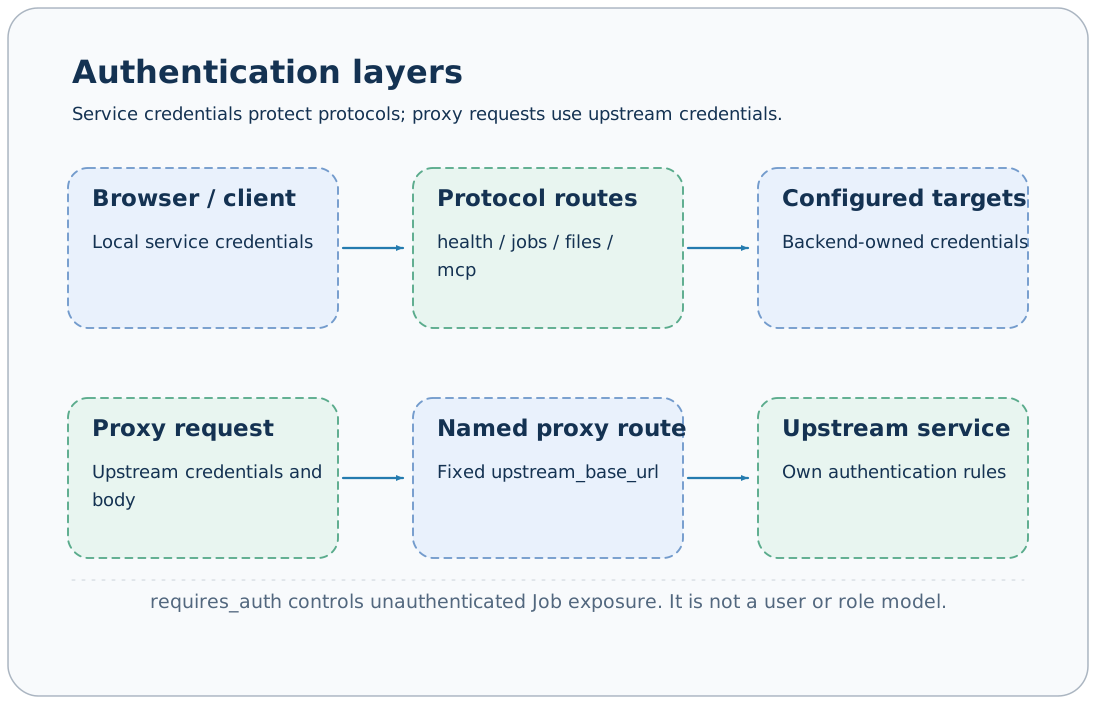
The AxonX service protects protocol calls with a Bearer token. This credential grants access to the service's public capabilities; it is not a permission model separated by user, project, or role. Configuring a token is a necessary first step for running default task Jobs.
Configure service credentials
The default configuration reads AXONX_SERVICE_TOKEN:
export AXONX_SERVICE_TOKEN='<service token you generate>'
axonx start
Explicit YAML can use environment expansion:
extends: default
service:
  token: ${AXONX_SERVICE_TOKEN}
Only a nonempty token is a valid credential; restart the service after changing configuration or environment variables. Example placeholders are not real credentials you can reuse.
Protocol protection scope
| Route | With a configured service token |
|---|---|
| /health | Requires Bearer |
| /jobs and subpaths | Requires Bearer, including SSE |
| /files and subpaths | Requires Bearer |
| /mcp and subpaths | Requires Bearer |
| Studio static pages | Not blocked by the protocol token; APIs still require credentials |
| /proxy/ | Uses upstream authentication, without checking the service token |
Preflight OPTIONS requests do not perform this Bearer check. Allowing cross-origin requests does not allow executing Jobs without credentials; actual protocol calls still require authentication.
curl -fsS 'http://127.0.0.1:1024/jobs' \
  -H "Authorization: Bearer $AXONX_SERVICE_TOKEN"
Pass the token through the complete Authorization: Bearer <token> header, not a query parameter. MCP Streamable HTTP clients should set the same header.
Why Jobs are missing without a token
Jobs default to requires_auth: true. Without a configured service token, these Jobs do not enter the public catalog; only Jobs that are is_servable and require no authentication can be public.
jobs:
  public_version:
    requires_auth: false
    steps:
      - backend: version_step
This example explicitly exposes a low-risk version query. requires_auth: false only affects whether a service without a token exposes this Job; once the service enables a token, protocol-level Bearer validation still applies.
A missing Job in the catalog and HTTP 401 are therefore different cases: check public filtering conditions for the former and request credentials for the latter.
CLI and remote credentials
| Calling method | Default credential source |
|---|---|
| CLI without explicit --target | AXONX_SERVICE_TOKEN |
| CLI with explicit --target | AXONX_TARGET_TOKEN |
| CLI --token | Overrides the default environment source |
| Studio local API | Local token in browser settings |
| Studio backend forwarding | Local service configuration targets[].token |
export AXONX_TARGET_TOKEN='<target service token>'
axonx version --target 'https://research.example:443'
Do not enter the target token in local Studio settings. Studio first authenticates with the local protocol, then the local service authenticates with the target using credentials from targets.
Python clients should receive tokens explicitly unless the calling code implements environment-variable loading itself; do not apply CLI automatic loading rules to every client class.
Token storage in Studio
Enter the local service token in Studio's settings/connection credentials entry, then reload the Job catalog. The token applies to the local connection in the current browser; sharing browser profiles may share these settings.
Pages can load without a token, but task definitions, resources, and research queries will fail. Remove actual credentials and machine information from screenshots and shared configuration.
Actual scope of capability permissions
Clients authorized to call public Jobs can use the capabilities in that catalog. The default catalog includes operations such as shell execution, plugin installation, task deletion, and file deletion; understand the token's access scope in your deployment context.
enable_serve: false prevents a Job from being exposed through protocols, allowing internal scheduling. Hiding a page entry does not disable the backend Job; rely on the actual /jobs and service configuration.
The default Agent Job tool list mainly contains queries, but SDK tools, project settings, cwd, and permission_mode also affect its permissions. The default Agent uses bypassPermissions; a query list cannot establish that the entire Agent is read-only.
Proxy routes pass upstream request credentials and serve a different purpose from remote Job forwarding. Do not misuse the service Bearer token as a data-source token.
Troubleshoot credential issues
- Confirm which service receives the request, checking its address and execution machine.
- Check protocol access with
/healthand a Bearer token. - Query
/jobsto confirm the Job is public. - For Studio forwarding failures, check local and target credentials separately.
- Check whether the service restarted after the token update.
Remote machines · API overview · Agent configuration · HTTP proxy
Source: Authentication and public filtering, Job configuration, CLI token loading.