
Scheduled Job execution
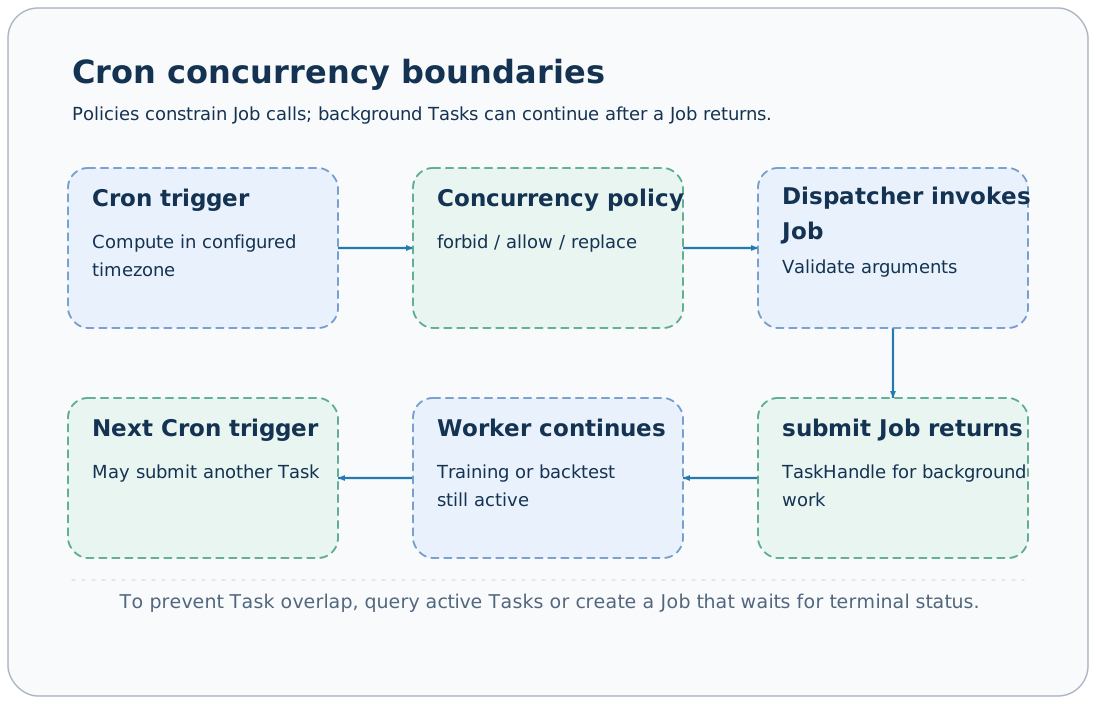
Scheduler triggers configured Jobs according to Cron and time zones, passing fixed arguments. The default schedules is empty, so no scheduled research runs in the background. Scheduling concurrency policies constrain the called Job's lifecycle; Tasks that continue running after submission require separate control.
Minimal configuration
The following calls the version Job hourly, making it suitable for checking scheduling configuration without external side effects:
extends: default
schedules:
  hourly_version:
    backend: cron
    job: version
    cron: "0 * * * *"
    timezone: Asia/Shanghai
    arguments: {}
concurrency_policy: forbidaxonx start --config scheduled.yamlSave the configuration as scheduled.yaml before running the command. Scheduler starts in the same Application as the service; no separate scheduler process deployment is required.
Startup checks that the Job exists and validates arguments against its Schema. Invalid Cron, unknown time zones, unknown Jobs, or incorrect parameters prevent normal startup; waiting until the trigger time cannot resolve them.
Cron and time zones
| Example | Intent |
|---|---|
* * * * * | Every minute |
0 * * * * | Every hour on the hour |
0 18 * * 1-5 | Weekdays at 18:00 |
30 2 * * * | Daily at 02:30 |
The default scheduling time zone uses the Application's timezone, which defaults to Asia/Shanghai; each schedule can override it.
The implementation uses croniter to calculate the next time. This is not a trading calendar, and weekday expressions cannot exclude holidays or market closures. Data download, training, and backtesting must independently verify the required trading-day ranges.
The service must remain running until the trigger time. The current loop calculates the next execution; it has no persistent queue to replay historical missed triggers and does not guarantee automatic compensation for schedules missed during downtime.
Pass Job arguments
schedules:
  daily_demo:
    backend: cron
    job: submit
    cron: "0 18 * * 1-5"
    arguments:
      task: demo
      x: 1
      y: 2
    concurrency_policy: forbid
Omitting task_name generates a distinct Task ID each time, retaining multiple results. A fixed name replaces the same-name directory after a terminal state; if the task is still active, the next submission fails.
The outer Schema of submit permits passthrough parameters, but specific Task fields are still validated by input_cls; successful scheduler startup does not mean every plugin's runtime prerequisites are satisfied.
Concurrency policies
| Policy | When the previous Job is still running |
|---|---|
| forbid | Skip the new trigger and log it; default |
| allow | Execute the new Job concurrently |
| replace | Cancel the old Job call, wait for cancellation, then trigger a new call |
For example, submit returns a TaskHandle almost immediately, while a training worker can continue for hours. In this case, forbid sees the submit Job has ended, and the next trigger still submits a new training Task.
replace cancels the asyncio Job call; it should not be interpreted as cancelling all workers that call previously started. To constrain overlapping research, write a custom Job that queries target task status, retains run_id, and waits for a terminal state, or explicitly rejects overlapping research before submission.
Schedule internal Jobs
Task synchronization commonly sets sync_flush to enable_serve: false so it is called only by scheduling through the internal Dispatcher:
schedules:
  workspace_sync:
    backend: cron
    job: sync_flush
    cron: "* * * * *"
    concurrency_policy: forbid
This fragment requires the sync component and sync_flush Job to be configured first as described in Task synchronization; it is not a complete standalone configuration. Scheduling targets do not need exposure as public HTTP Jobs.
Run checks and shutdown
Inspect service logs for skipped triggers, exceptions, and Job failures. Scheduler checks response.success and logs a warning for business failures; failure does not automatically create a compensating rerun.
For submit schedules, separately check Task status and logs to confirm research completion. External notification Jobs also need consideration of duplicate sends and failure retry semantics; simply applying a daily Cron does not establish a reliable notification workflow.
Closing Application stops the scheduling loop and cancels Jobs still executing. TaskManager handles worker shutdown through its own lifecycle; see Deployment.
Task management · Task synchronization · Configuration reference · Jobs and Tasks
Source: CronScheduler, ScheduleConfig.