
HTTP upstream proxy
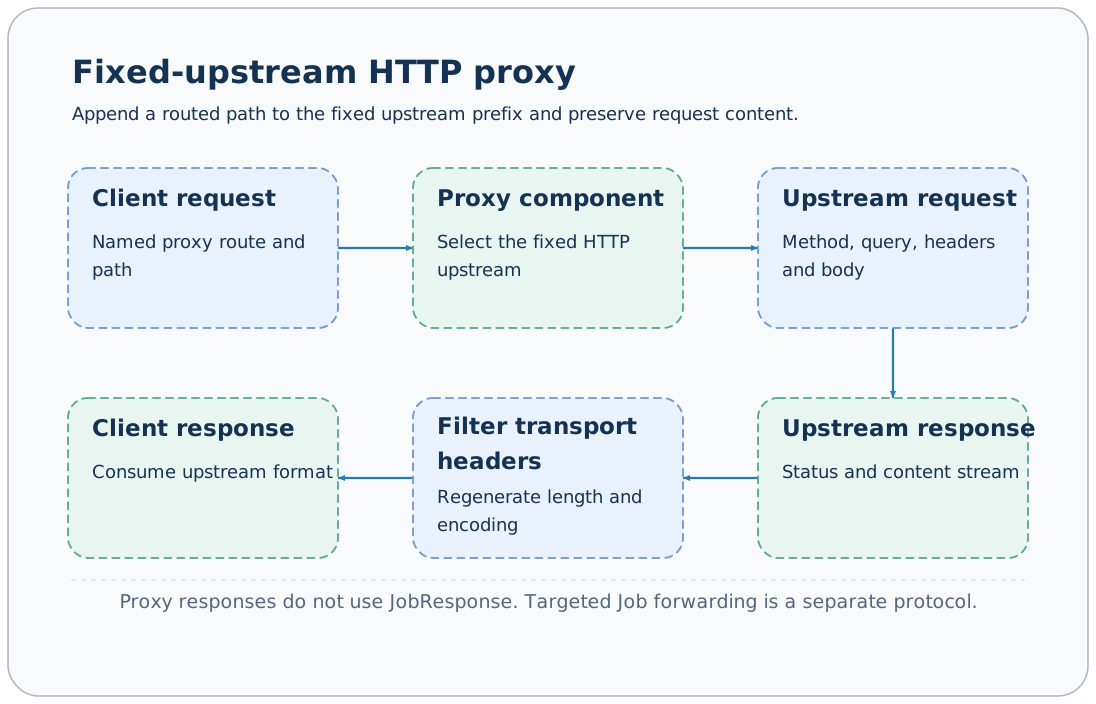
A named proxy component forwards /proxy/{name} requests to a configured fixed HTTP(S) upstream, preserving the request method, query, end-to-end headers, and body. This entry uses the upstream format directly without JobResponse wrapping, and differs from remote Job forwarding through targets.
Enable a proxy
Create proxy.yaml:
extends: default
components:
  proxy:
    tushare:
      backend: http
      upstream_base_url: ${AXONX_PROXY_UPSTREAM}
timeout: ${AXONX_TUSHARE_PROXY_TIMEOUT:-600}export AXONX_PROXY_UPSTREAM='https://data.example/api'
export AXONX_SERVICE_TOKEN='<service token>'
axonx start --config proxy.yamlThe upstream address is a placeholder; replace it with an actual compatible interface. This example uses the separate environment variable AXONX_PROXY_UPSTREAM to avoid confusion with the data Task's AXONX_TUSHARE_BASE_URL. The commented example in the default configuration uses the latter; when running a proxy and Task in the same service, set the upstream address and client proxy address separately to avoid forwarding back to itself. The default proxy is disabled, and requests to that name return Unknown proxy.
upstream_base_url must be an HTTP(S) URL with a host; timeout must exceed 0. The address is fixed in service configuration, and clients cannot select arbitrary upstreams through parameters.
Path mapping
| Client route | Example upstream |
|---|---|
| /proxy/tushare | https://data.example/api/ |
| /proxy/tushare/query | https://data.example/api/query |
| /proxy/tushare/query?date=20260105 | Same path with query preserved |
name selects the proxy component, and the remaining path is appended to the upstream prefix. Paths containing . or .. segments, or attempting to escape the prefix, are rejected.
DELETE, GET, HEAD, OPTIONS, PATCH, POST, and PUT are supported. Query parameters are forwarded as multiple values, and bodies are passed as content streams; the proxy does not actively parse research fields.
Call example
For a compatible JSON POST upstream:
curl -sS 'http://127.0.0.1:1024/proxy/tushare/trade_cal' \
  -H 'Content-Type: application/json' \
  -d '{"api_name":"trade_cal","token":"<upstream data-source token>","params":{"start_date":"20260105","end_date":"20260105"},"fields":""}'
The upstream protocol determines request fields. The example does not substitute the service token for the data-source token; actual usage still requires data-source permissions and call quotas.
You can also send the Authorization header required by the upstream. The proxy does not automatically turn configured service.token into upstream credentials.
Authentication and headers
/proxy is outside the protocol roots protected by the service Bearer token. Even with a service token enabled, proxy follows the upstream request's own authentication rules; configure the deployment entry for the required exposure scope.
The proxy preserves end-to-end request headers, but removes hop-by-hop headers such as host and connection, as well as headers named by Connection. host is generated from the selected upstream.
Responses retain the upstream status code and end-to-end response headers. After httpx decodes response content, content-encoding/content-length are removed or regenerated to avoid pairing decoded bodies with stale transport headers.
Timeouts and errors
| Situation | Result |
|---|---|
| Name does not exist | 404 Unknown proxy |
| Invalid proxy path | 422 request error |
| Upstream connection fails | 502 gateway error |
| Upstream timeout | 504 gateway timeout |
| Upstream returns 4xx/5xx normally | Upstream status and response body preserved |
Proxy responses have no success or answer wrapper; clients should assess HTTP status and the upstream body. Business success=false in Job forwarding and proxy errors have different diagnostic paths.
Service logs record the proxy method and path; when the upstream rejects a request, also check its token, fields, and permissions rather than only changing the AxonX service token.
Tushare usage path
The download_tushare_task client reads the environment variable AXONX_TUSHARE_BASE_URL. Set it to the proxy root http://127.0.0.1:1024/proxy/tushare; the client appends the API name, such as /trade_cal, and the proxy accesses the configured upstream. The proxy does not automatically download data, change trading days, or provide a data cache.
The source service handles the fixed upstream connection; the data Task remains responsible for its own credentials, parameters, retries, and Parquet writes. See Tushare data download.
Authentication · Remote machines · Deployment
Source: HTTP proxy, Proxy routes, Proxy errors.