
Python 调用参考
Python 可以在进程内嵌入 Application,或连接已经运行的 HTTP/MCP 服务。两种路径都返回 JobResponse,但生命周期、配置和执行位置不同。这里使用当前公开导出的类与函数。
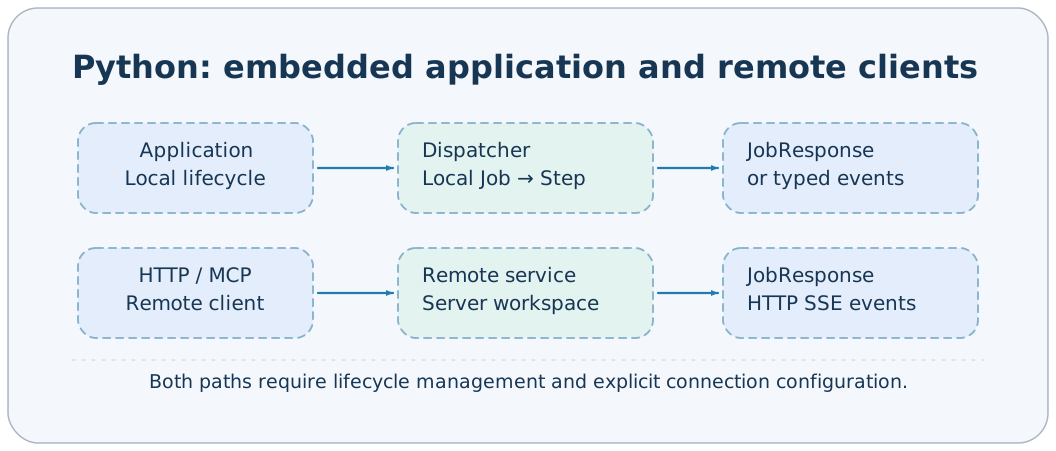
导入入口
from axonx import Application, BaseStep, provider
from axonx.config import resolve_app_config
from axonx.components.client import HttpClient, McpClient, RemoteServiceError
from axonx.core import run_remote_job, stream_remote_job
from axonx.components.job import ResultEvent
Application 从顶层导出;HTTP/MCP 客户端与事件类型从各自子包导出。项目使用 Python 3.12 语法,不能用较旧解释器直接导入。
嵌入 Application
import asyncio
from axonx import Application
from axonx.config import resolve_app_config

async def main():
    config = resolve_app_config(log_config=False, config="default")
    async with Application(**config) as app:
        response = await app.run_job("version", {})
        if not response.success:
            raise RuntimeError(str(response.answer))
        print(response.model_dump(mode="json"))

asyncio.run(main())
async with 按依赖顺序启动组件、Job、调度器,退出时反序关闭。这个例子不启动 HTTP 监听;service 的 run_app 由 CLI start 调用。加载 default 会装配其中组件,调用者需要当前环境可导入对应依赖;最小应用可只保留需要的 Job。
Application 不自动读取 .env;resolve_app_config 只展开已存在的环境变量。若需要 .env 先用应用自己的环境加载方式。
Application 方法
| 方法 | 参数 | 返回与限制 |
|---|---|---|
| start() | 无 | await,幂等启动 |
| close() | 无 | await,反序清理;多清理错误可能聚合 |
| run_job(name, arguments=None, *, target=None) | Job 名、参数映射、可选配置目标 | await 返回 JobResponse |
| stream_job(name, arguments=None, *, target=None) | 同上 | 返回 AsyncIterator,不 await 方法本身 |
run_job 与 stream_job 均要求应用已启动。target 非空时必须在 ApplicationConfig.targets 中,使用其中地址/token;本机调用不受 HTTP public_jobs 筛选限制,但仍校验业务 Schema 与系统保留字段。
HTTP 客户端
import asyncio
import os
from axonx.components.client import HttpClient

async def main():
    async with HttpClient(
        target="127.0.0.1:1024",
        token=os.environ["AXONX_SERVICE_TOKEN"],
        timeout=600.0,
    ) as client:
        definitions = await client.run_job("get_task_definition", {"task": "demo"})
        if not definitions.success:
            raise RuntimeError(str(definitions.answer))
        submitted = await client.run_job("submit", {"task": "demo", "x": 1, "y": 2})
        if not submitted.success:
            raise RuntimeError(str(submitted.answer))
        handle = submitted.answer
        completed = await client.run_job("wait_task", {
            "task_id": handle["task_id"],
            "run_id": handle["run_id"],
        })
        print(completed.success, completed.answer)

asyncio.run(main())
远程 answer 是解码后的字典/列表;本机 Application.answer 也可能保留 Pydantic/dataclass 对象。要统一处理,先调用 response.model_dump(mode="json"),不要假定两条路径中的 answer 都具有同一 Python 对象类型。
| HttpClient 方法 | 签名要点 | 返回 |
|---|---|---|
| run_job | name, arguments=None | JobResponse |
| stream_job | name, arguments=None | AsyncIterator[JobEvent] |
| list_jobs | 无 | list[JobInfo] |
| health | 无 | bool,失败折叠 false |
| copy_file | Path,filename=None,directory=None | FileCopy |
| discard_file | path: str | 清理的路径字符串 |
构造参数 target=None、timeout=60.0、token=None;可选 transport 用于注入 HTTP 传输(例如测试)。进入 async with 后才可调用。target 不含 /mcp 或 Job 子路径。
事件消费
async with HttpClient(target="127.0.0.1:1024", token=token, timeout=600.0) as client:
    async for event in client.stream_job("stream_task", {"task_id": task_id}):
        if isinstance(event, ResultEvent):
            response = event.response()
            print(response.success, response.answer)
        elif event.kind == "log":
            print(event.content, end="")
这是异步函数内的片段,token/task_id 来自配置与提交结果。详细 framing 与断线规则见 SSE。对提前停止消费的异步生成器,使用 contextlib.aclosing 保证关闭事件源。
文件上传
from pathlib import Path

async with HttpClient(target=target, token=token) as client:
    copied = await client.copy_file(Path("dist/axonx_example-0.1.0-py3-none-any.whl"))
    try:
        installed = await client.run_job("install_plugin", {
            "path": copied.path,
            "sha256": copied.sha256,
        })
        print(installed.model_dump(mode="json"))
    finally:
        await client.discard_file(copied.path)
这是安装流程片段,执行前需确认制品。copy_file 分块读取并上传,不把服务相对路径当成客户端文件路径。重复 discard_file 可清理已消费的暂存位置。
MCP 客户端
async with McpClient(target=target, token=token, timeout=60.0) as client:
    print(await client.health())
    jobs = await client.list_jobs()
    response = await client.run_job("list_task_ids", {})
    print(response.model_dump(mode="json"))
McpClient 的 health 使用 MCP ping;list_jobs 根据工具 Schema 生成 JobInfo;run_job 从 structured_content/data 校验 JobResponse。它没有 stream_job、copy_file 或 discard_file,实时事件和字节传输用 HttpClient。
一次性远程函数
response = await run_remote_job(
    "version", {}, target="node-b:1024", token=token, timeout=60.0
)
async for event in stream_remote_job(
    "stream_task", {"task_id": task_id},
    target="node-b:1024", token=token, timeout=600.0,
):
    print(event.model_dump(mode="json"))
arguments 是必填映射,每次创建并关闭 HttpClient。频繁查询用长生命周期客户端,避免反复连接。这个 target 是直连地址,不依赖本机 Application 的 targets。
错误与清理
try:
    async with HttpClient(target=target, token=token) as client:
        response = await client.run_job("status", {"task_id": task_id})
except RemoteServiceError as exc:
    print("连接或协议失败", exc.status_code, str(exc))
else:
    if not response.success:
        print("业务失败", response.answer)
连接失败、HTTP 拒绝、无效 envelope/事件触发 RemoteServiceError;HTTP 200 内 success=false 要单独判断。本机参数错误可直接抛 ValueError,Step 内异常通常被 Job 折叠。关闭 Application 会关闭任务管理器,其管理 worker 可能被取消,不适合用短生命周期嵌入应用提交任务后立即退出。
相关文档
实现依据:axonx/__init__.py、core/application.py、core/dispatch.py、components/client/。