
Extending Studio
This page explains how to add pages, forms, or charts to the existing Studio. For backend Task, Step, and Job extensions, see the development guide. For a first run, see getting started with Studio.
Development environment
Start the service from the repository root, then run the frontend in another terminal:
cd axonx_studio
npm ci
npm run dev
The complete development toolchain requires Node.js 22.13+ (22.x), 24.x, or 26+ to satisfy the locked Vite, ESLint, and Vitest dependencies. Vite listens on 4173 by default, and the development proxy connects to http://127.0.0.1:1024 by default. Use AXONX_DEV_SERVER to point to another backend and restart Vite after changing it. The proxy covers /health, /jobs, /files, /mcp, and /proxy.
npm run build performs TypeScript checks first, then outputs dist. Install the Python package with pip install ./axonx_studio from the repository root to let AxonX serve those assets. The development server provides hot updates.
Directory responsibilities
| Location | Responsibility |
|---|---|
src/app | Hash routing, navigation, machine selection, page dispatch, and shared application state |
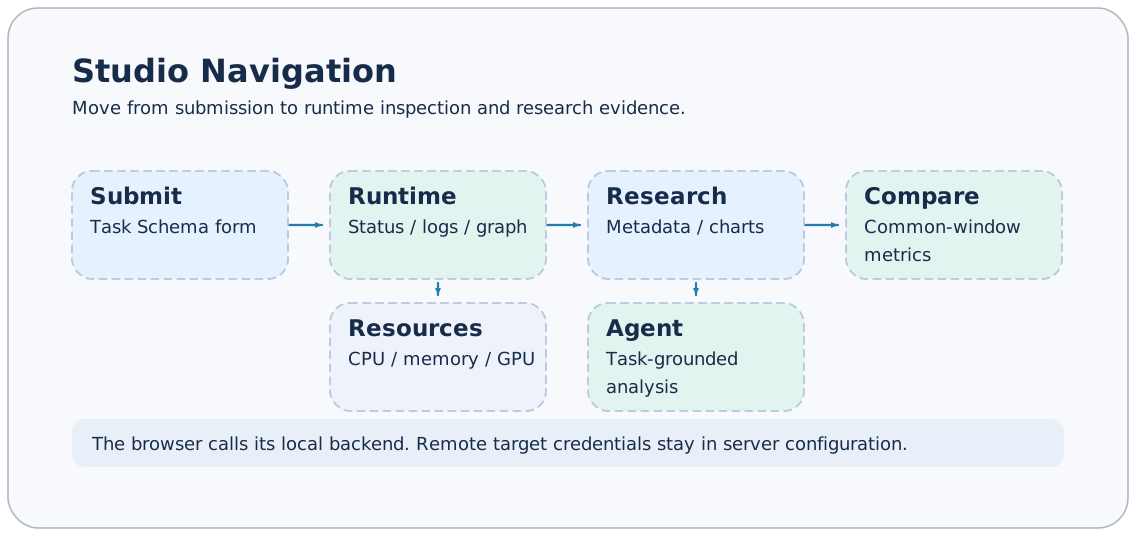
src/features | Business pages for submission, run center, Agent, research, and workspace |
src/shared/api | Job requests, response unwrapping, SSE, and shared types |
src/shared/schema | JSON Schema field types and form-value conversion |
src/shared/ui | Reusable components such as SchemaForm and panel dragging |
src/shared/hooks | Asynchronous loading, polling, and copy feedback |
src/styles | Design variables, shell, and feature styles |
src/locales | Chinese and English translation resources |
Adding a page
Routes use #<machineId>/<section>/<view>/<resource>. For example, #local/task-defs/catalog/demo identifies the local demo submission form. routeHash encodes resource identifiers and parseHash decodes them; do not manually concatenate Task IDs containing #.
- Create the page, necessary types, and API wrappers in
features/<feature>. - Register the section and default view in
app/routes.ts. - Add navigation entries in
app/navigation.ts. - Connect page dispatch in
app/PageOutlet.tsxand pass the selected machine. - Add user-visible text to both locales; keep the corresponding Chinese and English documentation in sync.
Distinguish page route state from temporary UI state. Shareable resource selections suit the Hash; expanded panels and loading progress belong in component state. Invalid sections return to the home page.
Calling the backend
Call Jobs consistently through axonx.invoke in shared/api/client.ts or an existing feature API wrapper:
const definitions = await axonx.invoke(
  "list_installed_task_definitions",
  {},
  { target: selectedMachine, signal: controller.signal },
);
The request body is { arguments, target }, and the outer response is JobResponse. The client handles HTTP errors and success: false centrally; business pages receive the unwrapped answer. Return types should reflect the actual backend protocol. Do not hide protocol differences with forced type assertions.
Machine selection must carry through lists, details, submission, and file previews. Same-origin /jobs requests include the service token from browser settings; the backend resolves remote target addresses and credentials. See the machine guide.
Forms and real-time state
Prefer reusing SchemaForm. Integer and floating-point fields become numbers, enums decode from JSON values, array and object inputs use JSON, and empty optional fields are omitted. Optional Boolean fields without defaults are also omitted when off. The server remains responsible for final validation.
Pass AbortSignal to cancel stale requests. Reuse usePolling for list polling and the SSE parser for long-task events. Completion of a Job call does not mean a background Task has finished. See real-time events for the event protocol.
Charts and files
Research pages read task artifacts. New calculations should follow explicit definitions and explain differences from plugin summaries. See the research artifact reference for the sources of training curves, returns, holdings, and other fields. Missing files and empty data should have clear empty states.
Keep file previews workspace-relative. /files provides temporary uploads and cleanup, not general downloads; obtain complete artifacts from the execution machine's workspace. Do not concatenate server absolute paths into public UI. On pages with multiple charts, handle container resize and release resources on component unmount.
Verification and submission
npm run test
npm run lint
npm run build
Choose relevant tests for the changes. Existing tests cover routing, Schema value conversion, event parsing, and request unwrapping and can be extended. UI checks should at least cover English and Chinese, empty data, loading failures, long text, and narrow windows. Do not expose tokens, private sessions, task identifiers, or machine addresses in screenshots.
When updating user documentation, also add feature entry points, prerequisites, steps, and failure handling. Screenshots and SVGs use English, and screenshots must not contain credentials, private paths, or session content.
Implementation references
axonx_studio/src/app/routes.ts,PageOutlet.tsx,navigation.tsaxonx_studio/src/shared/api/client.ts,event.tsaxonx_studio/src/shared/schema/values.tsaxonx_studio/vite.config.ts,package.json
Static Playground
The website includes a standalone Studio at /AxonX/playground/. It uses the same pages, Job envelopes and SSE parser as the service-backed application. No Python service, database or LLM is involved. Securities and research results are synthetic. Agent replies are scripted.
npm ci
npm run dev:playground
# Open http://localhost:4173/AxonX/playground/
npm run build:playground
DOCS_BASE determines the mount prefix (default /AxonX/). The separate dist-playground/ output leaves the ordinary dist/ used by Python packaging untouched. The documentation build constructs and merges this output into its Pages artifact. Install dependencies in both axonx_studio/ and github-pages/ before building the website.
All requests, including streams, go through AxonXClient.request. The default transport calls same-origin HTTP; main.tsx injects createPlayground() before mounting in Playground mode. Authentication is disabled for this simulated client. Feature API wrappers do not branch on mode. Unknown Jobs, files and remote targets return explicit errors without network fallback.
playground/fixtures.ts creates a virtual workspace with a complete ETL → analysis → training → prediction → backtest chain and two backtests. JSON table previews implement the existing Parquet preview protocol without shipping a Parquet decoder. Returns and summary metrics are generated from the same series.
playground/runtime.ts owns task and file state; agent.ts owns scripted sessions and tool messages; stream.ts owns event subscription cleanup; catalog.ts declares supported Jobs. Submitted tasks advance from elapsed time even without subscribers; status requests and streams reconcile that state. Task cancellation stops execution, while AbortSignal only closes an obsolete subscription and releases its timer. Successful runs add metadata and artifacts; failed or cancelled runs do not. The strategy parameter selects synthetic results; outcome selects success or failure. No submitted configuration executes a real research algorithm.
Refresh or use Reset demo to recreate initial state. There is no persisted execution state. Tests exercise data contracts, pagination, lifecycle, deletion, stream cleanup, scripted conversations and network isolation. Verify both normal and Playground builds; the website verifier checks the merged Playground entry and asset paths.